When I started my own business, the online side of it felt exciting and a little overwhelming at once. I saw pretty quickly that my new business needed a solid online foundation, which sent me searching for fast web hosting for small businesses. This was about more than quick page loads. It shaped my site’s performance, my search engine positions, and the experience visitors would have.
Web hosting comes in a few flavors: shared, VPS, dedicated, and each one has its own tradeoffs. In this post I want to share how my hosting choices played out, the moments that changed my thinking, and why fast hosting matters so much for a young business. Whether you’re just getting started or scaling up, follow along as I describe my search for hosting that actually worked.
1. The digital side of running a business
A business today can’t sit on the sidelines online. Having a solid web presence isn’t a luxury anymore, it’s expected. That online world is huge and full of possibilities, which makes it appealing and a bit intimidating at the same time. For someone like me stepping into it, that meant taking on both the difficulties and the openings it offered.
HP Z800 back sideGetting a handle on how all this works was my first step. A website is the digital storefront for any business. A physical store needs a good location and a solid foundation, and a website needs a dependable hosting platform in the same way. That’s where I started, working through the many options, each one claiming to be the answer to online success.
As I looked around, I learned it isn’t just about having a website. It’s about making sure that site is accessible, fast, and reliable. The choices I made would shape my brand’s reputation online, its reach, and how well it connected with the people I wanted to reach.
2. First steps: the basics of web hosting
Web hosting is basically renting space for a store, except the store is digital. It’s where all the files, data, and content that make up your website live. Just as a good location can bring more foot traffic to a physical shop, good hosting can shape a site’s performance, reach, and the overall experience for visitors.
At first I was buried under new terms and jargon. Bandwidth, disk space, uptime, domains. It felt like learning a language. But I knew I had to understand these basics to make a good decision.
Bandwidth is the amount of data that can move between your website, its users, and the internet. Think of it as the width of a pipe: the wider it is, the more water, or data, can flow through at once. For businesses expecting heavy traffic or running resource-heavy operations, you need plenty of bandwidth.
Disk space is the amount of storage your hosting provider gives you. It’s where your site’s files, media, databases, and other core pieces are kept. Many providers now offer generous or even unlimited storage, but it still pays to make sure you have room to grow.
Uptime measures how reliable a host is. It’s given as a percentage that shows how much of the time your site is up and reachable. A provider promising 99.9% uptime means your site will, in theory, be down for roughly 8 hours over a year. Every minute your site is unreachable can mean lost opportunities and revenue.
Uptime promises look identical across marketing pages, which is why how one provider held up over time tells you more than a published percentage.
Windows 10 update at 54% on a HP z800A domain is the address people type to reach your website. Pick something memorable and relevant. Many hosting providers include domain registration in their packages, which makes setup easier.
As I got into all of this, I saw that understanding these foundations mattered a lot. They form the backbone of any hosting service. The right combination can push a website forward, keep things running smoothly, and keep visitors happy. Skip them, and you end up with operational hiccups, a worse experience for users, and missed chances.
My early days in hosting taught me one thing above all: knowing this stuff pays off. Once I understood the fundamentals, I was in a much better spot to judge and pick a hosting service that fit my business goals and where I wanted it to go.
3. Why fast web hosting matters
Online, where milliseconds count, how fast a website loads has become a real factor in whether it succeeds. At first I figured a couple of seconds here or there wouldn’t change much for visitors or for the business. The deeper I got, the more I saw how wrong that was.
User experience and bounce rates. Research consistently shows people expect a website to load in 2 seconds or less. Every second past that raises the odds a visitor leaves. Slow sites come across as untrustworthy or unprofessional, which drives up bounce rates and costs you business.
SEO and visibility. Search engines like Google weigh page load times when they rank sites. Fast sites get rewarded with higher placements, which means more visibility and more organic traffic. A slow site can end up buried pages deep, where potential customers won’t find it.
Conversion rates and revenue. Speed hits the bottom line. A one-second delay in page response can cut conversions by 7%. So if an e-commerce site earns $100,000 a day, that one-second delay could cost $2.5 million in lost sales a year.
Operational efficiency. If your business runs on web-based tools or platforms day to day, speed matters. Slow hosting drags down productivity and creates frustration and waste.
Mobile optimization. More and more people reach websites on their phones, so a site tuned for mobile speed is essential. Slow loads hurt more on mobile, because people on those devices tend to have less patience.
As I worked to find the right hosting for my business, speed turned into a requirement I wouldn’t bend on. It wasn’t only about a quicker browsing experience. It was about visibility, better conversions, and building an online brand people could trust. Paying for fast hosting wasn’t a luxury, it was a deliberate move to give my business a real shot at long-term growth in a crowded market.
With that in mind, I got pickier, favoring providers known for performance, reliability, and speed. Online, speed isn’t just about time. It’s about opportunities, trust, and whether the business does well.
4. Shared hosting: an accessible starting point
When I first waded into web hosting, one term kept coming up: shared hosting. A lot of people treat it as the way in, and it gets praised for being cheap and easy. Like everything, it has upsides and downsides.
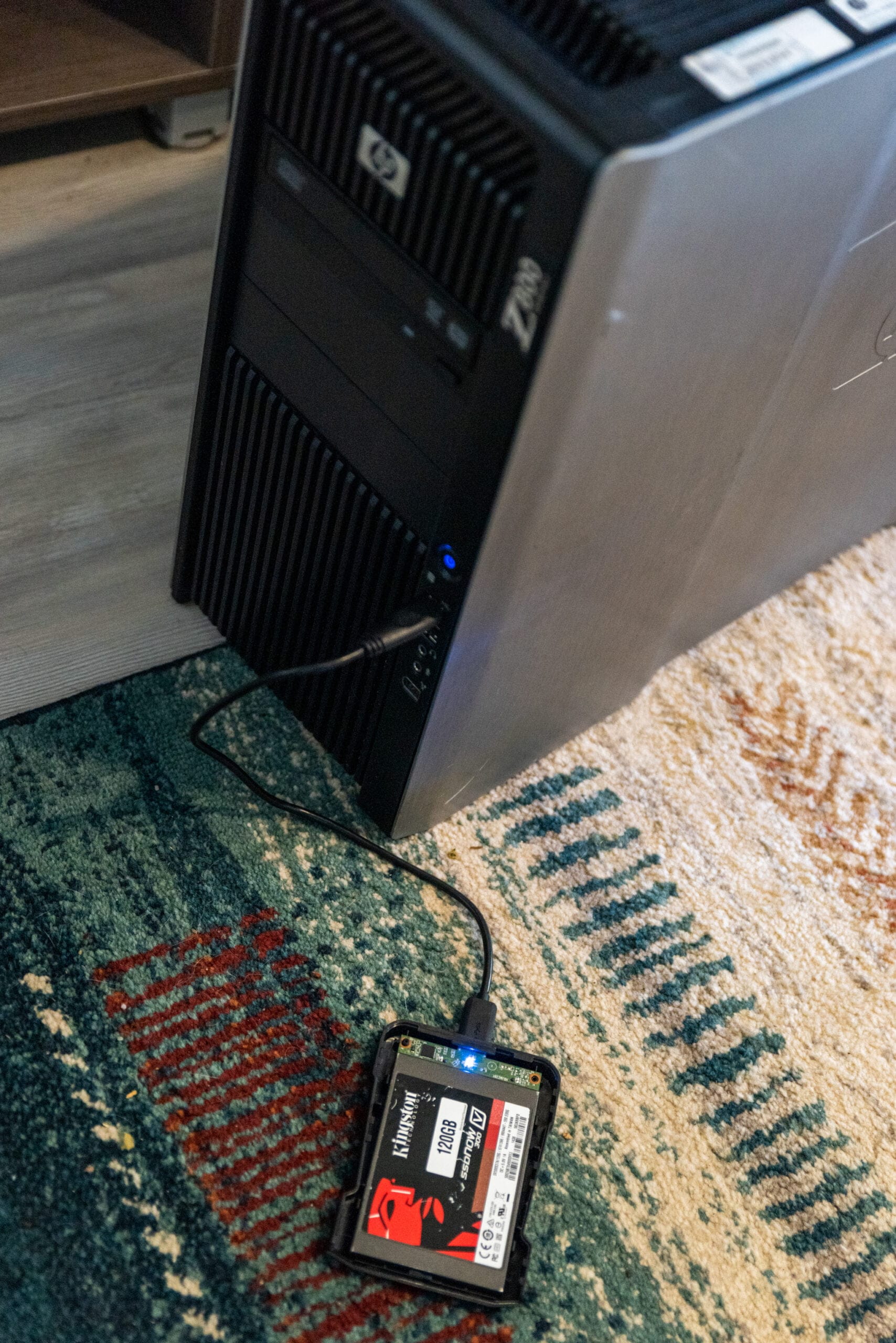
An SSD connected as a Windows Boot USB device to a HP Z800 WorkstationThe basics of shared hosting. It’s a lot like living in an apartment building. Several tenants, or websites, share the same building, which is the server. That means they also share the building’s resources, like electricity and water, or in hosting terms, CPU, memory, and bandwidth.
The pros
1. Cost-effective. The main draw of shared hosting is the price. Since server resources are split among many users, the costs are split too. For startups or small sites with limited traffic, that’s appealing.
2. Simplified management. Most shared hosts give you friendly control panels, pre-installed apps, and one-click installs, which suits people without much technical background.
3. Maintenance-free. The provider handles server maintenance, updates, and security, so you can focus on content and running the business.
The challenges
1. Limited resources. Sharing saves money, but it can cause performance problems. If one site on the server gets a traffic surge or hogs resources, the other sites can suffer.
2. Security concerns. Since many sites share one environment, if one gets compromised, there’s a chance it affects others.
3. Less customizability. Shared hosting doesn’t give you the flexibility other types do. You may hit limits on software installs, configurations, or server access.
My time on shared hosting was mixed. On one side, it was a cheap way to get my website live without draining my budget. Setup was simple, and I didn’t have to fuss over the details of managing a server. But as the business grew and traffic climbed, the limits showed. Slow loads, occasional downtime, and resource caps started holding my site back.
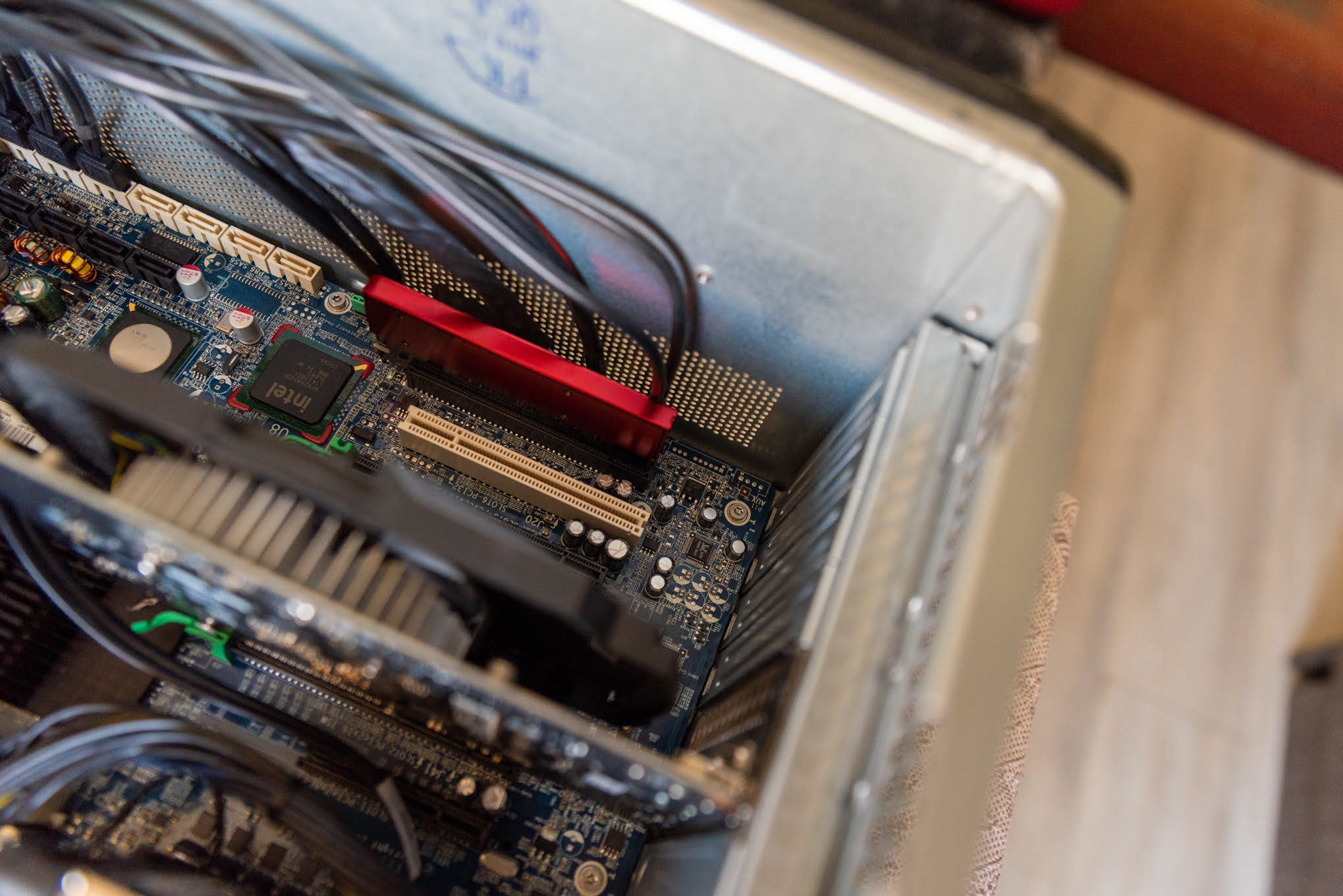
M.2 SSD installation on Z800Shared hosting was a useful first step that taught me a lot and set the groundwork for what came next. It’s a good fit for plenty of people, but you also have to recognize when it’s time to move up to something stronger.
5. VPS hosting: finding the middle ground
After shared hosting, I found another option worth considering: Virtual Private Server, or VPS, hosting. It struck a balance, giving me more power and control than shared hosting without the big cost of a dedicated server.
Understanding VPS hosting. Picture a large server split into several independent virtual compartments. Each one works as its own separate server with its own dedicated resources, but they all sit on the same physical machine. That’s VPS hosting in short.
The Benefits:
1. Dedicated resources. Unlike shared hosting, where resources go around to everyone, VPS guarantees a set amount of CPU, memory, and bandwidth. That means steadier performance and less downtime.
2. Greater flexibility. With VPS I could shape my environment. If I wanted to install specific software or change server settings, I had the freedom to do it.
3. Enhanced security. Each virtual server runs on its own. So even if another VPS on the same physical machine ran into security trouble, my environment stayed unaffected.
Potential Drawbacks:
1. Costlier than shared hosting. VPS gives you more, but it usually costs more than shared hosting. For some small businesses or personal sites, it can be more than they need.
2. Technical expertise required. To get the most out of VPS, some technical know-how helps. Plenty of providers offer managed VPS plans, but knowing your way around is an advantage.
3. Resource limitations. VPS gives you dedicated resources, but there’s still a ceiling. If your site outgrows it, you may need to look at something more advanced.
My run with VPS hosting opened my eyes. The extra control and the performance jump showed up right away. My site loaded faster, held up better during traffic surges, and gave me more room to experiment and tune things. It had a steeper learning curve and a higher price, but the gains were clear.
VPS hosting was a real step up, sitting between entry-level shared hosting and top-tier dedicated servers. It met my growing business needs and gave me a solid base to keep building on.
6. Dedicated servers: the gold standard for growing brands
As the business grew and traffic climbed, I started to feel the limits of my VPS setup. That’s when I looked at dedicated servers, which many treat as the top of the hosting ladder. The pitch was simple: better performance, more control, stronger security.
What is a dedicated server? True to the name, it’s a single physical server given over entirely to one user or business. Unlike shared or VPS hosting, where people share resources, with a dedicated server everything, from CPU, memory, and storage to bandwidth, is yours alone.
M.2 SSD installation on Z800The Advantages:
1. Peak performance. With the whole server at my disposal, my site loaded very fast, handled traffic spikes with ease, and gave visitors a smooth experience.
2. Complete customization. The control was on another level. I could pick the hardware specs, the operating system, the software, and adjust every part of the server to fit what I needed.
3. Enhanced security. Because a dedicated server is isolated, no other website can threaten your environment. Add custom security measures on top, and my site was well protected against most threats.
The Challenges:
1. Higher costs. This quality has a price. Dedicated servers cost a lot more than shared or VPS hosting. Still, the spend makes sense for businesses that need peak performance and strong security.
2. Requires technical expertise. Running a dedicated server takes a solid grasp of server administration. Some providers offer managed dedicated plans, but having the skills in-house or hiring people for it can be important for keeping the server in good shape.
3. Resource allocation. A dedicated server gives you a lot of resources, so it’s worth checking you’re not paying for more than you use. Reviewing things regularly helps you get good value.
Moving to a dedicated server changed things for me. The speed and reliability gains were obvious right away. It gave me peace of mind, knowing visitors were getting the best experience I could offer. Setup took more work and more money up front, but the payoff in performance, security, and reputation was worth it.
Among hosting options, dedicated servers are the gold standard for brands that put performance, security, and control first. It’s an investment in a growing business, now and down the road.
7. Performance metrics: judging your hosting’s real potential
Hosting keeps changing, and just when I thought I understood dedicated servers, another option showed up: cloud hosting. Sold as a future-proof choice, cloud hosting promised scalability, reliability, and a lot of flexibility.
Defining cloud hosting. Rather than lean on a single physical server, cloud hosting uses many connected servers to create a virtualized server environment. That network of servers handles your website’s operations together, keeping performance and uptime steady.
The Upsides:
1. Scalability on demand. One of the best parts of cloud hosting is how it scales. As my site’s needs changed, I could adjust resources on the fly without any disruption. A sudden traffic surge or a new feature rollout, the cloud handled it with no trouble.
2. High availability and uptime. With data mirrored across several servers, if one server had a problem, another picked up the load. That redundancy kept my site online and reachable.
3. Cost efficiency. Instead of a fixed monthly fee, I paid for the resources I actually used. That pay-as-you-go model meant I only paid for what I consumed, which saved money over time.
The Considerations:
1. Complexity. Cloud setups can get complicated. Configuring and managing one often calls for specialized knowledge.
2. Security concerns. Cloud providers put strong security in place, but spreading data across many servers can raise its own security questions. Pick a provider with a solid track record and add your own security measures.
3. Variable costs. Pay-as-you-go can save money, but it also means the bill moves around. A sudden spike in traffic or usage can lead to charges you didn’t expect.
Cloud hosting reshaped how I ran things. Its agility and resilience meant my site was ready for the future and able to handle whatever came up in the moment. The learning curve was steep at first, but the flexibility, performance, and cost savings made it worthwhile.
Cloud hosting is a different way of thinking about web hosting, mixing the sturdiness of traditional hosting with more flexibility. For businesses trying to stay a step ahead online, the cloud is a strong option.
8. Security and reliability: non-negotiables in web hosting
As my online presence grew, so did the risks and the potential threats. Security online isn’t optional, it’s necessary. Getting the hosting environment secure became a priority, for my own peace of mind and for my brand’s reputation.
Why hosting security matters. Every day, thousands of websites get hit by cyber-attacks, from DDoS attacks to malware. These can lead to data breaches, lost customer trust, legal trouble, and financial losses.
Key Security Measures I Adopted:
1. SSL certificates. To encrypt the data moving between my server and users, I put an SSL certificate in place right away. It protected data and also helped my site’s credibility and SEO ranking.
2. Regular backups. I can’t say this strongly enough: back up consistently. Whether it was a server failure or an attack, up-to-date backups meant I could restore my site quickly.
3. Firewalls and DDoS protection. A web application firewall, or WAF, filtered out malicious traffic and threats. DDoS protection kept my site online and working even during large attack attempts.
4. Malware scanning and removal. Regular malware scans mattered. By catching and removing malicious software quickly, I kept my site secure and intact.
Things to Watch Out For:
1. Outdated software. Attackers often exploit holes in old software. I made a point of updating all software, plugins, and scripts regularly.
2. Weak passwords. Strong, unique passwords for my server, website, and database were a must. Two-factor authentication added another layer.
3. Suspicious activity. Watching server logs and site activity let me spot and deal with anything odd right away.
Working through all this taught me that security is ongoing, not a one-time task. Threats keep changing, so staying proactive, watchful, and informed was how I kept my environment secure.
The HP Z800 exterior aluminium caseA well-secured hosting setup protects your data and your business, and it builds trust with your visitors. When data breaches keep making the news, security can set your brand apart.
9. Scaling with grace: adapting your hosting as your business grows
As my site pulled in more traffic and attention, one thing became clear: a slow site sends visitors packing. Speed wasn’t just a performance number, it shaped user experience and search rankings. So I set out to make my site faster without giving up any of its features.
The need for speed. Studies show a one-second delay in load time can cut conversions by 7%, drop page views by 11%, and lower customer satisfaction by 16%. The message is plain: speed matters.
Strategies I adopted for speed optimization
1. Content delivery network (CDN). A CDN let me spread out the work of delivering content. CDNs keep cached copies of my site on servers around the world, so users load it from a nearby server and pages come up faster.
2. Optimizing images. Big image files were one of the main causes of slow pages. By compressing images and using the right format, I cut page weight without losing image quality.
3. Minifying code. Minifying my CSS, JavaScript, and HTML stripped out unnecessary characters like spaces and comments, which sped up load times.
4. Caching. Caching meant returning visitors got faster loads, since parts of my site were stored in their browser.
5. Reducing redirects. Each redirect adds another HTTP request-response cycle and slows things down. Cutting redirects made the path through my site smoother.
Challenges and learnings
1. Balancing act. Getting good performance without losing features or looks took a careful balance. It meant testing and tweaking again and again.
2. Continuous monitoring. Site performance doesn’t stand still. As content, traffic, and visitor behavior shifted, I had to keep monitoring and tuning.
3. Mobile optimization. A big share of my visitors came in on phones, so mobile wasn’t just about how the site looked but also how fast it ran.
Speeding up my site meant plenty of experiments, learning, and the occasional setback. But the payoff, in better user experience, more conversions, and higher search rankings, made it worth the effort.
Improving site performance never really ends, but it pays off for both visitors and the business.