
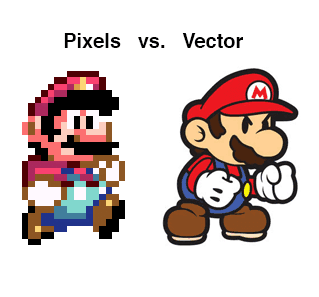
On screens, visual work can be presented in two basic formats: Vector Graphics or Raster Graphics (bitmaps). The first allows scalability. The second, though often more visually appealing, resists it. Knowing when to use each format matters, because it shapes how well you can present your artwork on a screen and what you can add to a website without slowing it down.
SVG is one of the main formats, arguably the main one, for representing vector graphics. It has been around since the early 2000s, but early on few browsers supported it, and at the time it mattered less than it does now. Today, with people reaching websites on devices of every screen size, SVG has become a format you almost have to reach for.
Why scalability matters for responsive design
Mobile first is the working philosophy behind current web design, which means pages scale up and down depending on the screen used to view them. Bitmap images are useful, but they cause headaches when a layout needs to stretch or shrink. SVG scales up and down cleanly, which makes it a natural fit for responsive design.
SVG files can be used two ways: as image files with the .svg extension, or inline as SVG code inside the page. As code, the format gives you more room to manipulate the file directly.
The advantage of vector graphics is that they scale up or down without losing detail. This feature is what makes SVG suited to a mobile-ready web. You can scale an SVG up many times over and keep every edge sharp. You can shrink it just as far, though at that point you would need a magnifying glass to make it out. Either way, no detail is lost, because the image is described by math rather than by a fixed grid of pixels.
Small files, faster pages
SVGs take up very little space, because vector graphics are stored as instructions rather than as large arrays of pixel data the way raster files are. That small footprint is another reason SVG works well for the web and for vector design in general. When space is a constraint, SVG files hold up.
On websites, image size affects how fast pages load, and that matters most when a site leans heavily on graphics. SVG lets you express an idea visually without fretting over file weight. The more illustrations, images, icons, and graphics a design calls for, the more useful SVG becomes. If you want to go deeper on the craft, you can learn more about creating SVG files and other vector work by signing up for an Illustrator training class.
Page speed is not a cosmetic concern for a photographer or artist trying to be found. Many people look for local businesses and services online before anything else. Pew Research Center’s report on where people get information about local businesses (2011) found that 38% of American adults turn to search engines for information about restaurants, bars, and clubs, and 36% use search engines for other local businesses. A portfolio that loads quickly and displays crisply on a phone gives you a real edge when a prospective client is deciding whether to keep reading or move on.
Editing, color, and animation
You can edit SVG in common graphics applications such as Adobe Illustrator, CorelDraw, or Sketch. If you are creating illustrations or graphics for screens, saving as SVG is usually a better move than saving as .png or .jpg. The moment you export to .png or .jpg, you have converted the artwork into a bitmap, and bitmaps do not offer the editing flexibility that vectors do. Save the same work as an SVG file and you keep the vector nature of the piece. Because it is a vector graphic, you can use the embedded SVG code to modify the artwork whenever you need to. That comes in handy for changing colors, or for preparing the artwork for any kind of animation.
On animation: icons are often built from sprites, which are near-identical images that differ in small ways, such as color or an added detail. SVG lets you change properties like color on the fly through the embedded code. When you build icons, or images that respond to what a visitor does, you can create one SVG and adjust it with code rather than producing a sprite for each state. That is a practical kind of flexibility, and it keeps a project easier to maintain over time.
How SVG fits into being found online
None of this technical convenience helps if nobody sees your work, and how images and pages are organized directly affects whether people can find them at all. In their standard reference on information architecture (2015), Louis Rosenfeld, Peter Morville, and Jorge Arango argue that the way information is organized, labeled, and categorized determines whether people can locate it, and they treat browsing structured categories and searching as complementary paths to the same goal. For a photographer or artist, that means two things travel together: clean, fast-loading pages that show your work well, and a place in the curated listings and directories where potential clients actually go looking. A sharp SVG logo or icon set does the first job. Being listed somewhere human-reviewed does the second.
Trust plays into this too. Rachel Botsman, in “Who Can You Trust?” (2017), describes a shift toward what she calls distributed trust, where ratings, reviews, and platform reputation systems let strangers extend confidence to businesses and people they have never met. A prospective client who has never worked with you weighs how you present yourself online. Presentation that is quick, consistent, and professional, down to the icons and graphics on your site, feeds that first impression.
A practical takeaway
If you work on screens as a photographer or an artist, learning to represent your work with SVG gives you flexibility that bitmaps cannot match. The format gained wider popularity in design around 2014, and its use has kept growing as browser support settled and responsive design became standard. Expect that to continue, simply because the convenience is real.
Start small. Export your logo, your icon set, and any flat illustrations as SVG, keep your photographs in a suitable raster format where fine tonal detail matters, and check that your pages load fast on a phone. Then make sure the site itself is easy to find, both through search and through the curated directories where clients look. Get those two pieces working together and your portfolio does more of the selling for you.
