Key takeaways
- You can build a free ticketing system inside Office 365 using native tools such as Microsoft Forms, Power Automate, and SharePoint Lists.
- Several third-party platforms offer free plans, each with its own features and agent limits.
- Your organizational needs, growth potential, and integration requirements should drive the selection process.
Managing support requests and internal tasks is a challenge for many businesses, especially as more of them rely on collaboration tools like Office 365. Good ticketing software tracks issues and keeps communication flowing across teams. For many companies, the balance between cost and functionality matters most, which makes free options appealing. If you are searching for aA Microsoft 365 ticketing systemA that works well and stays within budget, several solutions fit different operational needs and team sizes.
Office 365 integrates well, which makes it a sensible base for a ticketing system. Using Microsoft’s own tools or a third-party provider, you can build a workflow that reduces delays and keeps everyone informed. The right choice means weighing price against feature set, scalability, and support availability, so your team stays organized without a lot of overhead.
Some of the strongest free ticketing options work directly with Office 365, so teams manage their workflows without leaving the Microsoft environment. Integration with email, automation tools, and team chat improves productivity and supports growth over time.
Teams still on an older on-premises Exchange server will not see those integrations until they move, and planning an Exchange 2010 migration carefully keeps that move from disrupting the helpdesk itself.
Once you compare the platforms and see how each one works alongside Office 365, businesses can improve issue management and team collaboration while controlling costs. What suits you depends on your team’s size, technical resources, and support requirements.
Using Microsoft tools for ticketing
Microsoft 365 includes tools you can assemble into an internal ticketing solution. Using products you already pay for cuts costs and gives you immediate integration with daily work.
- Microsoft Forms and Power Automate:A Set up Forms for ticket submission and use Power Automate to route tickets, and incoming requests reach the right people quickly.
- SharePoint Lists:A SharePoint works as a simple ticket tracker. You can log and update every incoming ticket, which keeps status tracking and accountability straightforward.
- Planner:A Microsoft Planner handles task assignment and progress tracking. It is not a traditional ticketing system, but you can adapt it to simpler support setups.
These Microsoft-based approaches suit smaller teams or organizations just starting with systematic ticketing. Teams with higher support volumes or more complex workflows may need additional features.
Third-party free ticketing solutions
Besides Microsoft’s own utilities, several third-party vendors offer ticketing platforms with free tiers. These systems usually connect to Office 365 through integrations or connectors, and they tend to add more ticketing capability for IT and support teams.
- Freshdesk:A This popular option has a free plan for up to 10 agents, with core helpdesk features such as email ticket management and a shared knowledge base.
- Zoho Desk:A The free tier covers up to 3 agents and focuses on basic ticket creation, workflow automation, and standard analytics.
- FreeScout:A This open-source platform sets no user limit and suits organizations with the technical skills to self-host.
These platforms lower your upfront costs, but watch for limits on advanced features or ticket volume. Depending on what you need, you may have to budget for a later upgrade.
Integration with Office 365
How well a ticketing tool integrates with Office 365 matters when you choose one. Some third-party vendors offer direct connectors so you can manage support tickets and conversations inside Microsoft Teams and Outlook. With Teams integration, for example, your team handles ticket notifications and discussions without switching apps, which speeds up responses and cuts down on information silos.
- Teams integration:A Agents collaborate and resolve tickets right inside their communication hub.
- Single sign-on:A Many platforms let you sign in with your Office 365 credentials, which centralizes authentication and improves security.
Integration is easier with some tools than others. A few setups are quick, while others need third-party connectors or extra configuration. For fuller guidance on integrations, the materials atA TechRadarA are worth a look.
Weighing scalability and support
Before you settle on a ticketing system, think about how much your organization may grow and how much you value long-term support. A scalable system keeps meeting your needs as ticket volume and headcount rise. Many free platforms also offer limited customer support, so an active online community and good documentation can make the difference during setup and troubleshooting.
- Scalability:A Confirm the solution can handle future increases in support requests and agent numbers.
- Support and community:A Look for forums, how-to guides, and user communities that make up for limited direct support.
Security considerations
Protecting confidential information is essential, especially in systems that handle both internal and external requests. Whether you stay with Microsoft’s native tools or add a third-party solution, read the security policies carefully.
- Data privacy:A Check for GDPR, HIPAA, or other relevant compliance certifications.
- Access controls:A Set up role-based permissions so only authorized users see sensitive data.
Keeping access control tight and understanding how each provider handles data protection will help you maintain your organization’s data security posture.
Native Microsoft 365 ticketing capabilities
The most cost-conscious starting point is the Microsoft 365 stack itself. Organisations already paying for Business Standard or Business Premium licences own every component needed to assemble a working ticketing layer at no extra cost. You pay in configuration effort rather than licensing spend.
Microsoft Lists as a lightweight ticketing layer
Microsoft Lists, promoted to a full application in 2020, provides structured data storage with rich column types (choice, person, status, date), conditional formatting, and rule-based notifications. A Lists template named Issue tracker ships out of the box and can become a help-desk queue within an hour. Pair it with Microsoft Forms for intake and a Teams channel for collaboration, and you get a complete capture, triage, and resolve cycle without third-party software.
The constraints are real. There are no native SLA timers, reporting beyond Power BI exports is limited, and a customer-facing portal has to be built manually in SharePoint or Power Pages. For teams of fewer than ten agents handling internal IT, HR, or facilities requests, though, the model holds up well and avoids the integration debt that third-party tools accumulate.
Power Automate and approval workflows
Power Automate extends the Lists approach into automation. Standard connectors handle email parsing from a shared mailbox, ticket creation, escalation timers, and Teams notifications. Each licensed user gets a quota of seeded flow runs that covers moderate ticket volumes. The premium connectors for SAP, Salesforce, or on-premises data gateways carry per-user costs and should stay out of any honest free calculation.
Open-source self-hosted alternatives
When the Microsoft-native route falls short, usually once a customer-facing portal, structured knowledge base, or contractual SLA enforcement becomes mandatory, the open-source ecosystem offers mature options that integrate with Microsoft 365 through SMTP, IMAP, and SAML.
osTicket and Hesk
osTicket is the most widely deployed open-source ticketing platform, with simple PHP deployment on any LAMP stack. It supports multi-department routing, canned responses, agent-collision detection, and email piping. You can configure SAML authentication against Microsoft Entra ID for staff single sign-on at no licensing cost. Hesk follows a similar architecture but trades feature depth for simplicity. Both need a self-hosted server and ongoing patching, so the apparent zero cost is offset by infrastructure and maintenance time.
Zammad and Request Tracker
Zammad is a more modern option built on Ruby and Elasticsearch, with a polished interface and native Microsoft 365 mailbox integration through Microsoft Graph. Request Tracker (RT), maintained by Best Practical, remains the choice of many universities and ISPs for its scriptability and audit trail, though its interface shows its age.
Vendor free tiers with Microsoft 365 connectors
A third path uses the free tiers of commercial SaaS vendors, most of which publish certified Microsoft Teams or Outlook add-ins. Freshdesk Free supports up to ten agents with email ticketing, a knowledge base, and basic reporting. Zoho Desk Free caps at three agents but includes a customer portal and private knowledge base. HubSpot Service Hub’s free tier includes a shared inbox, ticket pipelines, and live chat, and pairs closely with the wider HubSpot CRM.
Authentication and single sign-on considerations
The free tiers rarely include SAML or SCIM. Identity federation with Entra ID usually sits behind a paid plan, so free deployments may depend on local accounts and manual provisioning. If your security baseline mandates conditional access or just-in-time access, that constraint alone can rule out the free tier before you even compare features.
Comparative overview
| Platform | Agent Limit (Free) | Hosting | M365 Integration | Customer Portal | SAML SSO Free |
|---|---|---|---|---|---|
| Microsoft Lists + Power Automate | Unlimited (within tenant) | SaaS | Native | Manual build | Yes (Entra ID) |
| osTicket | Unlimited | Self-hosted | Email + SAML | Yes | Yes |
| Hesk | Unlimited | Self-hosted | Email only | Yes | No |
| Zammad (Community) | Unlimited | Self-hosted | Graph API | Yes | Yes |
| Freshdesk Free | 10 | SaaS | Teams add-in | Yes | No |
| Zoho Desk Free | 3 | SaaS | Outlook add-in | Yes | No |
| HubSpot Service Hub Free | Unlimited (limited features) | SaaS | Outlook + Teams | Limited | No |
The cost, efficiency, and collaboration trade-off
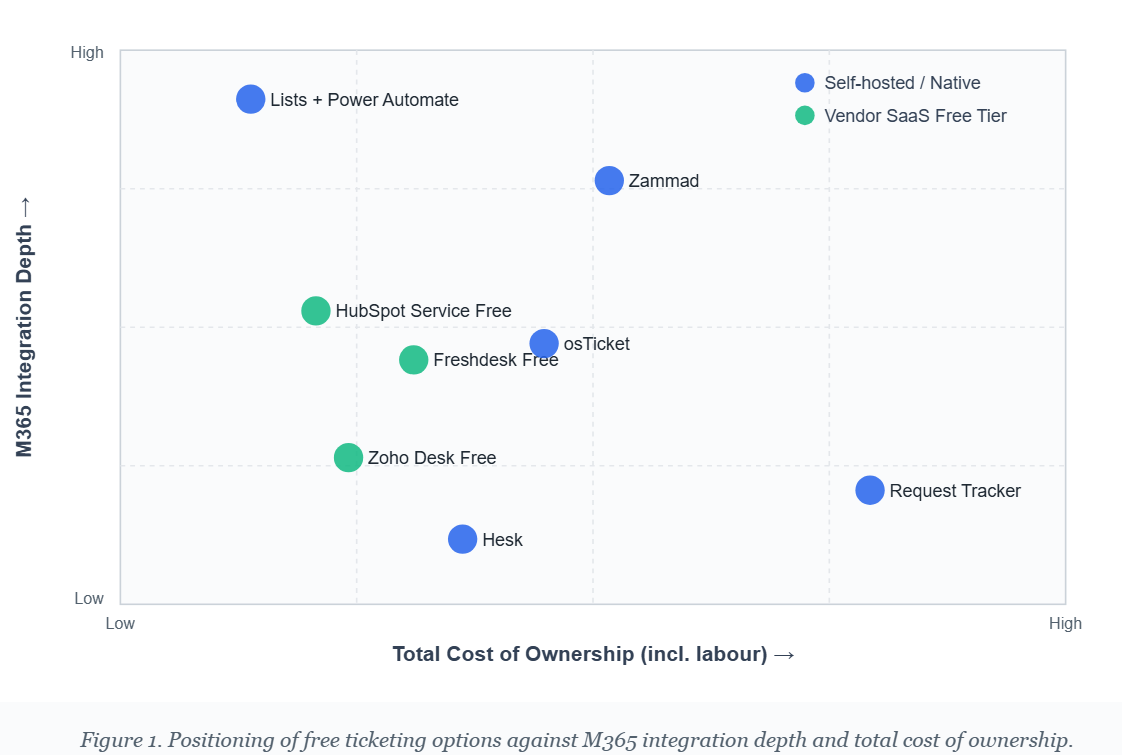
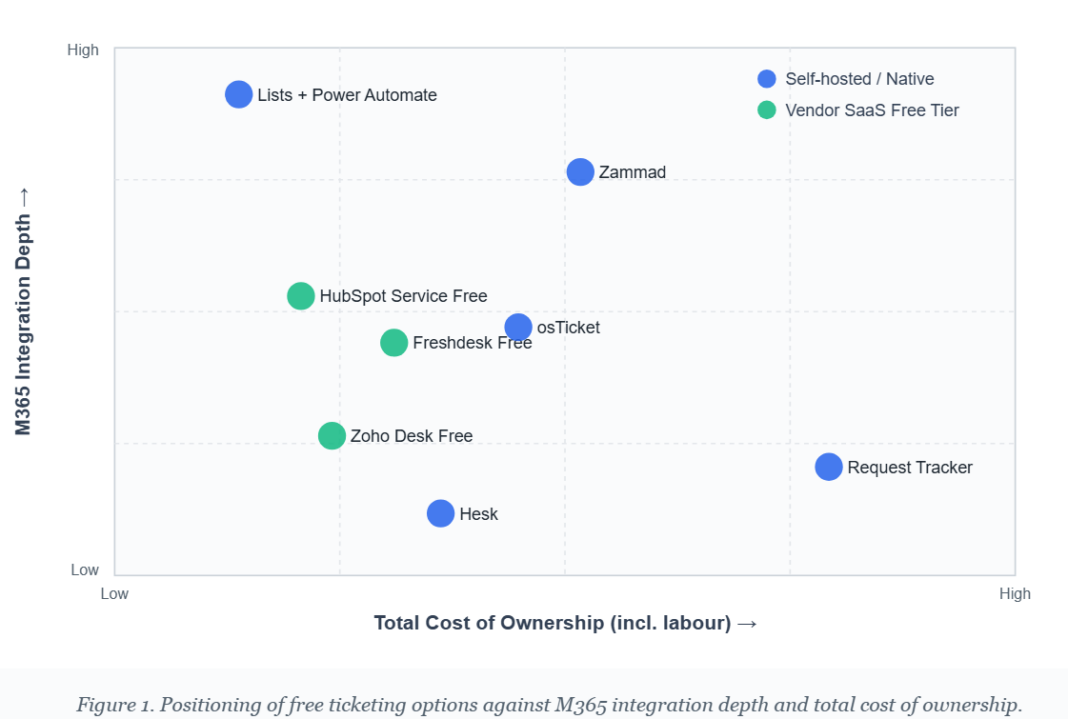
The chart places seven options along the two axes that matter most for Microsoft 365 environments: depth of integration with the existing tenant, and total cost of ownership once labour, hosting, and premium connectors are counted. The pattern is clear: free at the licence level rarely means free at the operational level. Native Microsoft tooling sits in the upper-left quadrant, the most defensible position, while vendor free tiers cluster in the middle band, appealing for fast deployment but limited by agent caps and missing SSO.
Hidden costs in “free” deployments
Three kinds of hidden cost recur. Self-hosted platforms bring server, backup, and patching labour estimated at four to eight hours per month for a small deployment. Vendor free tiers create upgrade pressure once user counts pass the cap, and moving off the platform is rarely free. Native Microsoft 365 builds use internal development capacity that could go elsewhere, so the marginal cost is opportunity cost rather than invoiced spend.
Selection criteria for small to mid-sized teams
Three questions narrow the field quickly. First, does the workload include external customers or is it internal only? External support needs a portal, branded email, and SLA reporting, which points toward Zammad, Freshdesk, or HubSpot. Second, what is the agent count and growth trajectory? Free tiers cap at three to ten agents, so a team expecting double-digit growth within twelve months should optimise for predictable scaling cost rather than the lowest entry price. Third, is identity federation a security requirement? If it is, native Microsoft 365 or self-hosted SAML-capable platforms beat vendor free tiers, which gate SSO behind paid plans.
A practical rule follows. Organisations under ten agents with internal-only workloads gain most from the Microsoft Lists plus Power Automate combination, because the cost is genuinely zero and the integration is native. Organisations with external-facing support or formal compliance constraints should treat free as a pilot phase, not a destination, and budget for the move to a paid tier within twelve to eighteen months.
Conclusion
With careful use of Microsoft tools and a well-chosen third-party integration or two, you can run capable free ticketing in Office 365. Picking the right Microsoft 365 ticketing system comes down to identifying your business requirements, examining integration and security needs, and planning for growth. Review your system as your organization changes, and you will keep efficiency and collaboration high without paying for more than you need.
