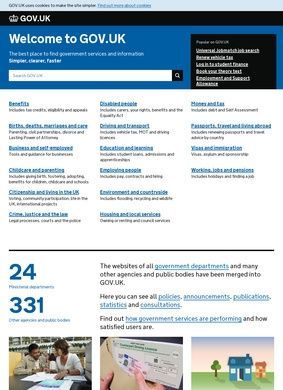
Renewing a passport, checking whether a used car has a valid MOT, registering a death, applying for Universal Credit, and filing a self-assessment tax return all happen on the same site, under the same plain blue header. Gov.uk pulled what used to be hundreds of separate departmental websites into one place starting in 2012, and the breadth of what it now answers is genuinely hard to overstate. It is the official UK government portal, run by the Government Digital Service, and it functions less as a website than as the front door to nearly every interaction a person has with the British state.
Sixteen topic areas cover government services
The Gov.uk home page sorts everything into sixteen broad topic areas, and those headings tell you most of what you need to know about its scope. Benefits covers Universal Credit, tax credits, eligibility checks and appeals. Births, deaths, marriages and care handles registration, certificates, and lasting power of attorney. There is a whole section for business and the self-employed, taking in company registration, VAT, business rates and licences, and a separate one for employing people that walks through PAYE, statutory pay and workplace pensions. The split between running a business and hiring staff is a sensible one, since the questions are rarely the same.
Driving, money and tax services
Driving and transport is probably the area most people touch first. It is where you renew a driving licence, run a free MOT history check on a registration plate, tax a vehicle, and reach the various DVLA services. Money and tax sits close behind in everyday use, pulling self-assessment, PAYE, inheritance tax and the personal tax account through to HMRC. The personal tax account in particular is one of those things that quietly removed a lot of phone calls and paper forms from people's lives, even if not everyone realises it lives on Gov.uk. The crime, justice and the law section, easy to overlook until you need it, covers court fines, jury service and legal aid, the kind of administrative weight that lands on people at the worst possible moment.
Specialist routes for disabled people
Beyond the obvious tax-and-licence chores, the coverage stretches into corners of life that catch people off guard. Disabled people get a dedicated route to Personal Independence Payment, the Blue Badge scheme and Access to Work. Childcare and parenting covers the Tax-Free Childcare account and school applications. Citizenship and living in the UK handles settled status, naturalisation and voter registration, while visas and immigration runs visa applications, right-to-work checks and the newer eVisa system. Passports, travel and living abroad combines passport renewals with foreign travel advice and the GHIC card that replaced the old EHIC.
Work, money and education clusters
Then there is the work-and-money cluster: a State Pension forecast, your National Insurance record, and the Find a Job search tool all sit under working, jobs and pensions. Education and learning gathers student finance, Ofsted reports and apprenticeships. Environment and countryside reaches into planning permission, flood warnings and farming subsidies, which is a reminder that the audience here extends well beyond individuals to landowners, farmers and small councils. Housing and local services ties in council tax, planning and Help to Buy, often handing off to a specific local authority once the postcode is known.
Where handoffs between systems fray
That handoff pattern is worth dwelling on, because it is where the experience can fray. Gov.uk is excellent at being the start of a journey, and the writing on its guidance pages is famously stripped down, short sentences, no jargon where plain words will do. But a fair number of services eventually pass you to a department's own system, HMRC, the DVLA, a council, and the polish does not always carry through the seam. The front door is consistent. What lies behind some of the doors is not, and a citizen who started on a clean Gov.uk guidance page can find themselves on a dated form that asks for information the previous screen already collected.
Publishing layer for policy documents
The other half of the site, easy to miss if you only ever arrive to do one task, is the publishing layer. Every UK government department posts its news, policy papers, statistics, consultations and research here. Legislation, Freedom of Information disclosures and open consultations are all surfaced in the same system. For a journalist, researcher, or anyone trying to follow how a policy moved from green paper to law, this is a serious archive, and it being centralised matters as much as any single document in it.
Search struggles with volume
Search is the part that divides opinion. With this much material under one roof, finding the precise page you need can mean wading through near-duplicates or landing on guidance that technically answers a different but adjacent question. The topic browsing is clean and the most common tasks are surfaced well, yet the deeper you go, the more the sheer volume works against you. Anyone hunting for a specific statistical release or an older policy paper will sometimes find a general web search points them back to the right Gov.uk page faster than the site's own box does. It is an odd verdict to reach about a site this well built, that the fastest way in is occasionally from outside it, but it holds true often enough to be worth flagging.
Consistent design across thousands of pages
One quiet strength is that the whole thing holds together as a single design system. The same typography, the same step-by-step layout, the same accessible markup runs across thousands of pages written by hundreds of separate teams. That consistency is the reason a passport page and a flood-warning page feel like the same product, and it is a large part of why the Gov.uk model has been studied and copied by other governments around the world. It is also why the occasional jump to a clunkier legacy back-end is so jarring by contrast.
Balancing plainness with completeness
What is harder to settle is whether breadth has quietly become its own problem. A site that must serve a first-time benefits claimant, a tax accountant, a farmer claiming a subsidy and a civil servant publishing statistics is asked to be plain enough for the first and complete enough for the last, and those are not always reconcilable goals. Gov.uk leans hard toward plainness, which is the right instinct for the millions of people who arrive once a year to do one thing. The guidance is clear until the rules behind it are not, and on the most tangled topics, eligibility edge cases, immigration status, overlapping benefits, the page can leave a reader confident they have read everything while still no clearer on which line applies to their case.