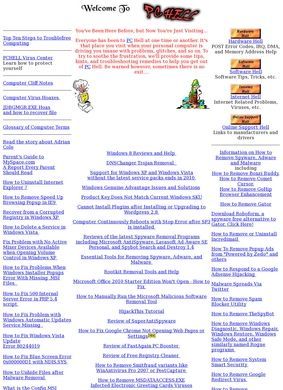
Most visitors arrive at the Virus Center first, and it sets the tone for the whole site: plain-language walkthroughs for pulling spyware and adware off a Windows machine, written for someone who has a problem right now and no IT department to call. PC Hell, run by Mark Hasting of Hasting Computer Consulting, is a free self-help reference built around exactly that kind of visitor. The target user is the home or small-office person staring at a sluggish PC, a strange error code, or a browser that keeps redirecting somewhere it should not.
Five sections for different PC problems
The material is organized into five sections, each with a deliberately grim name. Virus Center covers malware and spyware removal. Hardware Hell is where PC Hell earns the most durable shelf life, because it holds the sort of reference that has quietly disappeared from most of the modern web: POST error code listings, IRQ assignments, memory address tables. Software Hell collects Windows software tips and fixes, Internet Hell handles browser trouble and virus information, and Online Support Hell points outward to manufacturer support pages and driver downloads. The naming is a little theatrical, but it maps cleanly onto how people actually describe their computer problems.
Malware removal and security tools
Beyond the troubleshooting guides, PC Hell carries software reviews, and these are more useful as a category than they might first appear. There are write-ups of security tools like Malwarebytes Anti-Malware and Emsisoft Anti-Malware, the kind of programs a person reaches for after the spyware guides reveal something nasty. There are also reviews of utilities such as FastAgain PC Booster and MyCleanPC, the latter being exactly the genre of "speed up your PC" product that warrants a careful second opinion before anyone hands over a credit card.
That pairing, removal tutorials sitting next to honest evaluations of the cleanup tools themselves, is what gives PC Hell its character. A reader can diagnose the problem and then read a frank assessment of the software being marketed to fix it, all in one place. The writing throughout aims at the individual user on a single Windows machine, not an enterprise admin, and PC Hell stays at that level consistently across every section.
Hardware reference that ages well
The part that cannot be avoided: PC Hell was last updated on January 25, 2015. That is a long time for a technical reference to sit still, and it matters differently depending on which section you open. The Hardware Hell tables (POST codes, IRQ maps, memory addresses) age gracefully because the underlying facts have not moved. A POST beep code from a decade ago still means what it meant. The Virus Center and the security software reviews age in the opposite direction: malware shifts constantly, anti-malware products change hands, get rebranded, or vanish, and a removal walkthrough written for the threats of that era may describe tools and steps that no longer match what a current machine is running.
So the value depends heavily on what brought someone to PC Hell. For old-hardware reference and general Windows concepts, the content is reliable. For an active infection on a modern system, the guides are a starting point and a vocabulary lesson, not a guaranteed current fix. That is an honest limitation, not a knock on the original work.
Checking the update date and external feedback
A search for third-party feedback turns up very little. No Google, Trustpilot, Yelp, or BBB ratings surfaced for PC Hell, and most results point back to its own review articles plus a Datanyze company profile. There is no real body of external opinion to draw from in either direction. For a one-person reference project that has gone quiet since 2015, that is not surprising. The site lists an email address as the only contact option and reads more like a static archive than an active help desk. Mark Hasting's name appears in the footer, which at least confirms a real person built and maintained it, but there is no indication the address is still monitored.
Using PC Hell as a reference library
What that leaves is a site judged on its own contents rather than on a chorus of reviewers, and the contents are a genuine catalog of practical PC fixes from a particular slice of Windows history. PC Hell is best understood as a reference library: useful to bookmark for the hardware tables and the Windows fundamentals, worth reading with the calendar in mind for anything security-related. The five sections still load, still explain things in plain terms, and still cover a wide span of the problems a home user hits. They simply stopped at the start of 2015, and anyone arriving now has to factor that into how far they trust the advice.