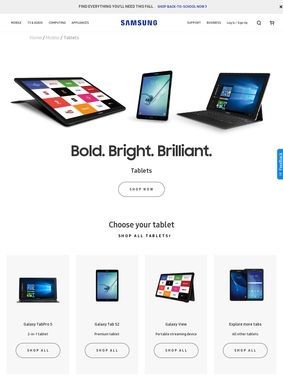
A tablet buyer asking whether the screen and stylus can handle real work will find samsung.com's Galaxy Tab pages doing most of the heavy lifting. The range runs from the 14.6-inch Samsung Galaxy Tab S11 Ultra, with its Dynamic AMOLED panel, MediaTek Dimensity 9400+, and storage that climbs to 1TB, down through mid-range LCDs and affordable TFT slabs aimed at families. The premium line holds together: large bright displays, fast chips, and an S Pen bundled in the box rather than sold separately.
Mid-range models deserve real attention
The mid-range gets real attention on the product pages, which is worth noting because many manufacturers treat anything outside the flagship tier as an afterthought. The Samsung Galaxy Tab S10 FE+ runs a 13.1-inch LCD on the Exynos 1580 with up to 256GB, the Galaxy Tab S10 FE drops to a 10.9-inch LCD, and the Galaxy Tab S10 Lite covers that same 10.9-inch size on the Exynos 1380. For buyers who care more about a sensible price than a perfect panel, the Galaxy Tab A11+ uses an 11-inch TFT on a MediaTek Dimensity 7300. The display technology shifts honestly as the price falls, from AMOLED on the expensive units to LCD and then TFT, and the listing does not bury that distinction.
Devices built for specific audiences
Families get a model built for them. The Samsung Galaxy Tab A11+ Kids Edition takes the same A11+ body and wraps it in child-focused software, which is a more practical answer to "is this safe for my eight-year-old" than handing a child a stripped-down adult device. That segmentation runs through the whole range. Creative professionals are pointed toward the S Pen and DeX combination, media watchers toward the wide AMOLED screens, students toward the affordable Galaxy Tab FE and A series, and enterprise buyers toward the rugged Galaxy Tab Active line, which exists for environments where a normal slab would not survive the week.
The S Pen ties premium features together
The S Pen deserves more than a passing mention because it is the thread that ties the premium tier together. It ships with the high-end models, and on recent devices it feeds into Samsung Galaxy AI tools for writing and even math, the sort of feature that sounds gimmicky until someone has scribbled an equation and watched it resolve. Pair that stylus with DeX, the desktop mode that reshapes the interface into something closer to a laptop, and the pitch for a tablet as a productivity machine starts to hold. A keyboard cover turns the same device into a passable typing station, and the accessory shelf carries those covers alongside S Pen cases and charging docks.
Durability and battery across the lineup
Durability is handled where it counts. The flagship units carry an IP68 rating, so a splash or a brief dunk is not a death sentence, and the high-refresh AMOLED panels make scrolling and sketching feel smooth in a way the spec sheet alone never conveys. Battery life is described as extended across the line, which for a tablet carries real weight since these are devices people leave on the couch for days between charges. Connectivity is sorted too: most models come in Wi-Fi and LTE or 5G variants, so a student on campus Wi-Fi and a field technician on a cellular plan can both find a fit.
One UI keeps the experience consistent
One UI, Samsung's take on Android, powers every device here, and the newer models fold Galaxy AI features directly into that skin. Whether that software layer is a selling point or a thing to tolerate depends on taste, but its presence across the whole lineup means the experience stays consistent as a buyer moves up or down the range. Someone who learns the gestures on a cheap A11+ will not feel lost on an S11 Ultra. That continuity is easy to overlook and genuinely useful when a household owns more than one of these.
Trade-in promotions and direct sales
The commercial side is straightforward and worth knowing before shopping elsewhere. Samsung sells directly and runs trade-in promotions, with credit reaching up to 500 dollars on the Tab S11 series for anyone with an old device to hand over. Trade-in math is rarely as generous as the headline number, but on a flagship purchase it can meaningfully soften the price, and seeing it offered on the manufacturer's own page removes a layer of third-party guesswork. The direct purchase route also means the configuration chosen, storage tier, color, cellular or not, is the one Samsung actually supports.
Overlapping models create buyer confusion
If there is a knock against the range, it is the same problem any large catalogue carries: the sheer number of overlapping models can leave a first-time buyer paralyzed. The gap between an S10 FE, an S10 FE+, and an S10 Lite is not obvious at a glance, and the leap from the Galaxy Tab A11+ to the S11 is enormous in both price and capability. The pages give the specifications to sort this out, but they ask the reader to do the sorting. A shopper who knows whether they want a big AMOLED canvas for drawing or a cheap LCD for the kids will navigate it quickly. One who just wants "a good tablet" has some reading ahead.
Each Galaxy Tab model serves a purpose
Set against the alternatives, the Samsung Galaxy Tab catalogue does the thing a strong product line should do: it gives a clear reason to pick each model. The Ultra is for people who want the largest, sharpest screen and the most storage. The plain S11 trims storage for a lower price while keeping the panel. The FE and Lite models exist for buyers who want Samsung's software and stylus support without the flagship outlay, and the A11+ and its Kids Edition reach down to households and younger users. The rugged Active line answers a question most consumer pages ignore entirely.
S Pen and DeX define productivity use
For students and creative workers, the S Pen and DeX pairing is where the Samsung Galaxy Tab earns serious consideration, because it pushes a tablet past consumption and into something a person can write, sketch, and present on. Media-first buyers will gravitate to the big AMOLED screens and the long battery, while parents have a purpose-built answer in the Kids Edition. A buyer who knows their use case will find the range covers it; the one who arrives undecided should work through the model comparison and confirm whether S Pen and DeX support appear on the tier they are eyeing, since that combination is what separates a Galaxy Tab used for watching from one used for working.