Two credits to watch the video, one credit for a Nano Banana Pro render, two for GPT Image 2. Thumbn prices a thumbnail run down to the individual image and exposes a cost estimate call so the total can be checked before anything is spent. That kind of arithmetic on a public page is uncommon in AI image products, and it sets the tone for the rest of the site.
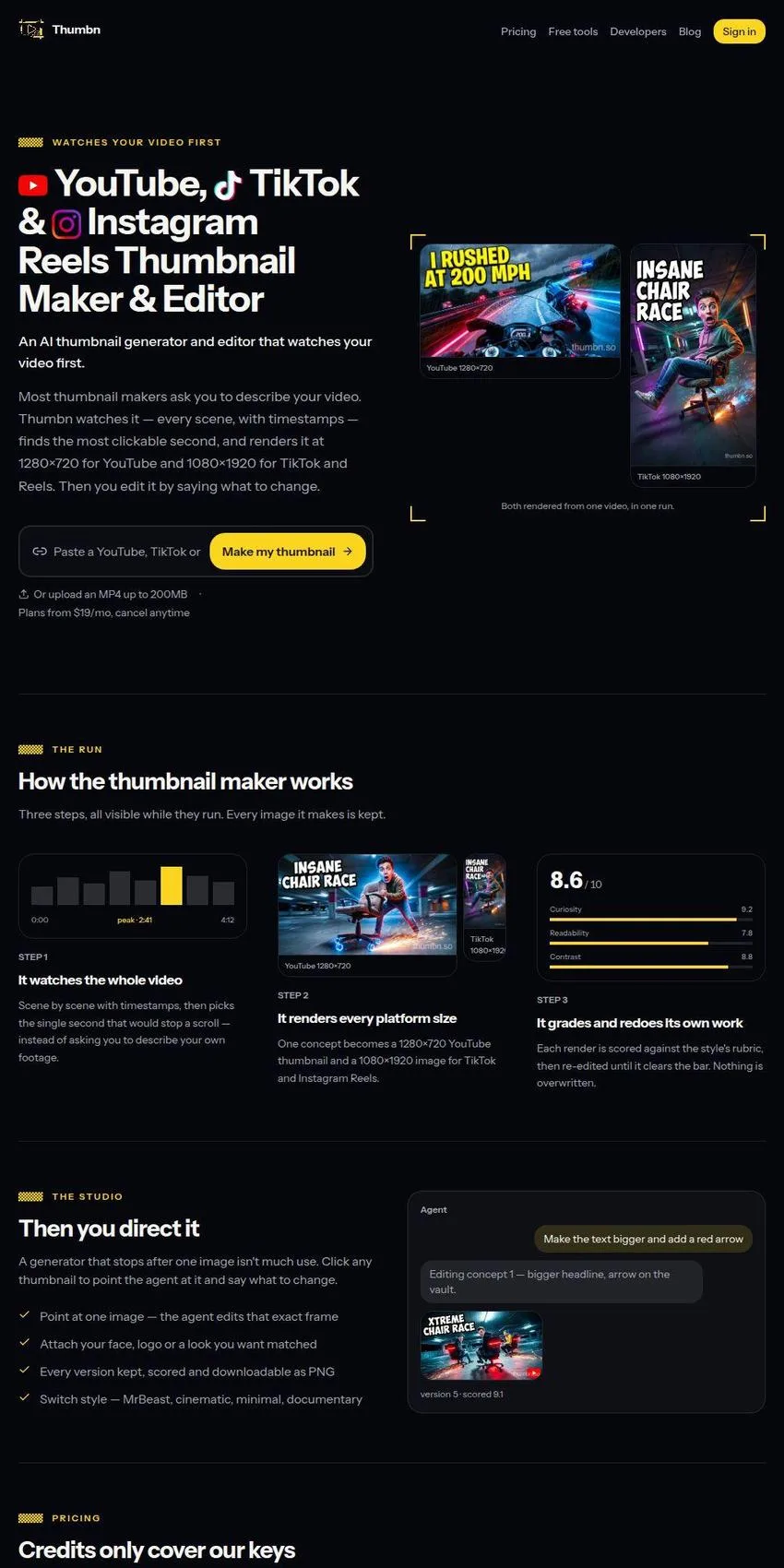
The premise is that the tool reads the footage instead of a prompt. Upload an MP4 of up to 200MB or paste a link, and Thumbn analyses the video scene by scene with timestamps, picks the second it judges most likely to stop a scroll, writes a concept around it, and renders that concept at 1280x720 for YouTube and 1080x1920 for TikTok and Instagram Reels. One run covers both orientations. The homepage demonstrates this with the same office chair race concept shown in landscape and in vertical, which makes the claim easy to check at a glance.
After the first render there is a chat studio. Click an image, describe the change you want (bigger headline, an arrow on the vault), and the agent edits that exact frame while keeping every earlier version, each one downloadable as a PNG. Reference images can be attached for a face, a logo or a look to match, and the style presets cover MrBeast, clickbait, cinematic, minimal, aesthetic and documentary. Every render is scored against a rubric, with sub-scores for curiosity, readability and contrast displayed on the page. I would not put much weight on a generator marking its own homework, and those numbers are best read as an internal redo trigger and no more.
The developer page is what separates Thumbn from the crowded field of prompt-to-image thumbnail sites. There is a REST API with a jobs endpoint and API key authentication, plus a Streamable HTTP MCP server running OAuth 2.1 with dynamic client registration and PKCE. Six tools are exposed, only one of which spends credits: creating a job, polling it, listing recent jobs, listing image models, estimating cost, and reading the account balance. Setup instructions are written out separately for Claude Code, the Claude desktop app, Codex CLI, the Codex app and Cursor, and they carry warnings that read like they came from real use, including the advice never to put an API key in a cleartext mcp.json that will end up committed to a repository.
Alongside the paid product sits a shelf of free utilities: a preview tool that mocks a thumbnail into the real YouTube feed and sidebar, a safe zone checker for vertical covers, a resizer with compression, a click-through rate calculator, and a downloader that pulls any public video's existing thumbnail. Several of them run entirely in the browser. Sharing that same shelf are downloaders for TikTok without watermark, Instagram Reels, YouTube Shorts and YouTube to MP4, which is a different business with different legal weather, and it sits oddly beneath a footer disclaiming any affiliation with those platforms. Thumbn's own explanation on that page says four of the five tools never leave your browser, while seventeen are listed directly above it. Nobody went back to fix the sentence.
Credits, keys and the paywall
Pricing has two tiers. Pro is $19 a month for 60 credits, Studio is $49 for 175, both charged in advance through Stripe. Monthly credits reset at renewal and do not carry over; credits bought as one-off packs never expire. Working from the published rates, a Pro month buys about ten full runs at four concepts each on the cheaper model, or roughly six if every render uses GPT Image 2. Nothing on the site does that sum for you, but the numbers are all there to do it.
There is also a bring-your-own-key route. Connect a Google, OpenAI or Anthropic key and those renders bill to the provider account instead of consuming credits from Thumbn's own allowance, though the plan fee still applies. That arrangement is stated plainly in the pricing block instead of being buried in the terms, and it gives heavy users an escape from the credit ceiling.
One thing does not line up. The terms and the developer FAQ both say access requires an active paid plan, and that an API key is simply another way to sign in as yourself, not a separate free tier. The free maker pages say something different: one watermarked thumbnail a day with no account, then unlimited watermark-free generation once you sign up free, with the studio watching your uploaded video. Both statements cannot be true. Anyone arriving from a search for a free YouTube thumbnail maker will hit that wall, and a single sentence reconciling the free account with the paid gate would cost the site nothing.
The small print and the support inbox
Thumbn is operated from the United Kingdom under the law of England and Wales, and its terms are franker than most. They admit output varies in quality, that no thumbnail is promised to be usable or to improve click-through rate, and that purely machine-generated images may not attract copyright at all in most jurisdictions, so exclusivity cannot be guaranteed. They also spell out the 14-day distance selling right, explain why beginning a subscription waives it, and offer a refund inside that window if nothing has been generated. Writing all of that down is a deliberate choice and it counts in the operator's favour.
Contact is thinner. There is a support email address and little else: no telephone number, no contact form, no published postal address, no stated hours. The terms undertake to supply full registered details, including an address for service, on request to that inbox. For a software subscription that may be tolerable, though a company name and a registration number printed on the page would settle the question immediately instead of through a request and a wait. Sign-in is Google only, which rules out anyone unwilling to attach a Google account to their video uploads.
A search turned up no independent reviews of Thumbn on any platform: nothing on Trustpilot, no G2 or Capterra listing, no user discussion threads. The site carries no customer testimonials either, which at least means it is not padding the page with unverifiable praise. What it does carry is a large volume of search-shaped landing pages, and the polish of that copy should be weighed separately from any evidence that the product performs.
For a creator publishing weekly who already pays for AI tooling and wants thumbnails made from inside Claude Code or Cursor, Thumbn has the stronger technical argument in this niche, and the watermarked daily freebie costs nothing before a card goes in. For anyone who wants proof from other users first, there is none to read yet. The sensible test is one real video through the free generator, held next to a thumbnail you made by hand, judged on the click numbers a fortnight later.