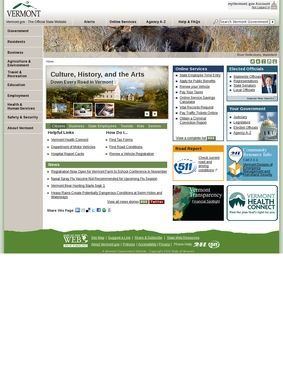
One state portal handles vehicle registration and renewal, individual income tax filing and payment, voter registration, and a search of birth, death, marriage, civil union, and divorce records, all from the same set of menus. That range is the first thing worth registering about The official website of the state of Vermont, which pulls services that would otherwise sit across a dozen separate department sites into six plain categories: Live, Work, Explore, Learn, Government, and Online Services.
It works as a gateway more than a place to linger. A global search box and a Custom Search tool sit near the top, and a short explainer flags the .gov domain and what that security marker signals. The organising idea is to route a person quickly to the agency or form that does the actual work, and for the most part The official website of the state of Vermont holds to that.
Renewals, filings, and vital records
The Live category on The official website of the state of Vermont is where residents will spend most of their time. It gathers vehicle registration and renewal, individual tax filing and payment, and the vital-record search that turns up birth, death, marriage, civil union, and divorce or dissolution certificates. There is public transportation information and a path into browsing the social and benefit assistance programs a household might qualify for.
These are the errands people put off, and grouping them behind one label spares the usual hunt through acronym-heavy department names, where a single certificate can otherwise mean guessing which office issues it and hoping the guess is right.
Online Services overlaps with Live by design, collecting the transactional pieces in one spot: vehicle registration renewal, public benefits applications, online tax filing and payment, and a tax return and refund status checker. Two entries there do quiet, practical work. A State Employee Phone Directory lets a resident reach a named office instead of a general switchboard, and Vermont Courts Online opens case lookups without a trip to a clerk. The official website of the state of Vermont treats these as headline items instead of buried links, which is the right call for tools people reach for under a deadline.
The refund status checker on The official website of the state of Vermont deserves a specific mention. Filing a return is one thing; being able to track that return and the refund afterward, from the same place, closes a loop many states leave open. It is a small feature that removes a phone call.
Voter registration and getting around
Voter registration sits inside the same Live menu, next to the transit information, and that pairing says something about how the site is organised: by what a person is trying to do, not by which department owns the paperwork. Someone new to Vermont can register to vote, work out how to get around without a car through the public transportation pages, and check which assistance programs they qualify for in a single sitting. It is mundane, and that is the strength of it.
The official website of the state of Vermont keeps the civic basics one or two clicks from the front door.
Work, tourism, and the outdoors
The Work category on The official website of the state of Vermont is aimed squarely at anyone starting or moving a business. It holds a business start-up guide, a business tax center, and relocation and expansion information written for new companies and incoming residents. A Permit Navigator tool tries to sort out which approvals a given venture needs, the sort of question that otherwise sends people ricocheting between agencies. Two employment routes sit alongside it: state government job listings for those who want to work for Vermont itself, and Vermont Job Link, a broader board for job seekers and employers.
Explore is the tourism and recreation half, and it reaches wider than a visitor bureau would. Along with general Vermont tourism information and historic sites, it links state parks, Fish and Wildlife licensing, permits and conservation material, a statewide events calendar, and road conditions. The Fish and Wildlife section is the meatier one, folding hunting and fishing licences together with the conservation reading a careful angler or hunter would want first.
That last item, the road report, belongs right where it sits. Anyone driving the state in winter wants the road report before the trail map, and The official website of the state of Vermont keeps the practical and the recreational in the same place.
The mix is a little uneven. A visitor, a hunter, and a festival-goer all land in the same category, and the events calendar can feel thin next to the licensing pages. But the logic holds: most of what a person does outdoors or on a trip through the state lives under one word.
Schools, prekindergarten, and libraries
Families get a well-stocked corner under Learn on The official website of the state of Vermont. There is a Vermont Schools Directory covering public, independent, and home-study programs, a colleges and universities directory, continuing education listings, and library resources for people who want to keep learning past school age. The continuing education and library links widen the audience past parents of school-age kids to adults retraining or working through a reading list, which is a sensible way to keep the category from being purely about children.
The entry that stands out is Universal Prekindergarten, described here as ten free hours for three-, four-, and five-year-olds, with State Board of Education information nearby for anyone who wants the policy behind the programs. A parent comparing schools or checking those free pre-K hours can do the groundwork before picking up the phone.
Government listings and the open data portal
The Government category is the reference desk of The official website of the state of Vermont. It carries Vermont Legislature information, an Agency A-Z directory, Vermont Judiciary and court-system material, and a statewide officials directory, so a resident can find who holds which office and how the courts fit together. Two entries push past the usual civics-brochure fare. An Open Data Portal publishes state datasets for anyone who wants the raw numbers, and a Financial Transparency section gathers budgets, performance-management reporting, and financial reports in one place.
That transparency material is the part worth singling out. For a citizen tracking where public money goes, budgets and performance reports on the main menu are concrete substance, and The official website of the state of Vermont puts them within reach instead of tucking them into a footer nobody scrolls to.
The honest limit is depth. The official website of the state of Vermont is a well-sorted index, and most links hand off to individual agencies where the real forms, logins, and fine print live. The portal itself rarely finishes a task end to end; it gets a person to the right door and stops there. The six-category scheme reads clearly, though a handful of services appear in more than one place, and that repetition can make the site feel as though it is circling back on itself.
Judged as what it sets out to be, the portal does the core job. The official website of the state of Vermont answers the two questions residents arrive with: what can the state do for me, and where do I go to do it. The vital-record search, the tax and refund tools, the Permit Navigator, and the Financial Transparency section are concrete reasons to keep it bookmarked.
Call it a qualified yes. The official website of the state of Vermont is a solid first stop for state business, on the understanding that the last mile almost always happens on some other page.