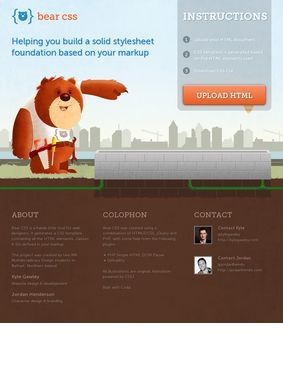
Feed it an HTML file and Bear CSS hands back a stylesheet built to match. That is the whole pitch, and it is a genuinely useful one. The tool reads through your markup, finds every element, class, and ID you have used, and writes out a CSS file where each of those selectors is waiting for you, empty and ready to fill. You still do the actual styling. What you skip is the tedious first hour of typing out selector names by hand and cross-checking that you caught them all.
This solves a small, real annoyance. Anyone who has hand-coded a page knows the drudgery of scrolling back through the HTML to make sure no class slipped past unstyled. Bear CSS parses the document for you and guarantees the skeleton is complete before you type a single property.
It is worth being clear about who this is for. The audience is web designers and developers who write their markup by hand and want a stylesheet that already lines up with it. That is a narrower group than it once was, but the people in it will recognize the workflow immediately. You do not need to read instructions to understand what the single page is asking of you: there is a file to upload and a button to press, and the result explains itself.
What the generator gives you and where it stops
The output is a scaffold, not a finished theme. Bear CSS does not guess colors, spacing, or typography for you, and it makes no attempt to. It writes the selectors and leaves the declarations blank. For a developer who already knows what the page should look like, Bear CSS offers exactly the right amount of help. Anyone hoping the tool will design the site for them will be disappointed, and honestly that limit is what keeps it trustworthy: it does one job and does not pretend to do more.
The upload flow is the core of Bear CSS. You point it at an HTML document, it runs the parse, and the download is your stylesheet.
How the upload and parse hold together
Under the hood Bear CSS leans on the PHP Simple HTML DOM Parser to walk the markup, with the Uploadify plugin handling the file transfer. That combination was standard for the era it came out of, and it does what it needs to. You get back a flat list of selectors mirroring the structure of what you sent in. There is no build step, no account, no configuration screen to wade through. Upload, parse, download.
Because the parser reads the literal markup, the quality of what Bear CSS returns depends on the quality of what you put in. A clean, well-classed HTML file produces a tidy stylesheet. Messy markup with inconsistent naming produces a stylesheet that mirrors that mess. The tool is a mirror, not an editor, and that is the honest way to describe it.
Built as a student project with real polish
Bear CSS came out of an MA in Multidisciplinary Design in Belfast, made by two students: Kyle Gawley handled the design and development, and Jordan Henderson did the character design and branding. That origin shows in a good way. The single page carries a cartoon bear and some CSS3 animation flourishes that give it personality without slowing anything down. It is HTML5, CSS, jQuery, and PHP holding up a tool that feels considered rather than thrown together for a class deadline.
The branding is the part that has aged well. Plenty of utilities from that period look like a raw form on a white background. Bear CSS has a face, literally, and a small sense of humor about itself. Both creators have moved on to other work since, with Kyle Gawley building products like usegravity.app and usealertly.com and Jordan Henderson keeping up his character and illustration work, and the craft that went into this early collaboration is easy to see in hindsight.
Recognition without a review trail
On the reputation side there is a specific gap worth naming. No Google, Trustpilot, Yelp, or BBB ratings turn up for Bear CSS, so there is no star count or crowd of user feedback to point to. What it does have is editorial recognition: One Page Love gave it a One Page Website Award and listed it on their site.
That is a curator's nod, not a consumer verdict, and the two are not the same thing. A design blog picking it out tells you people who judge web work for a living found it worth featuring. It does not tell you how thousands of users rated the download.
The One Page Love feature is not nothing, though. That site catalogues single-page designs and hands out its award to work that reads well on its own terms, so the nod lands on both the utility and the presentation. Given that Bear CSS is itself a one-page site, the recognition is doubly apt: the tool and its shop window are the same screen.
For a free single-purpose utility, that trade is fair enough. You are not handing over money or data, so the stakes of having zero user ratings anywhere are low. Still, someone who wants social proof before trusting Bear CSS should know it is running on editorial approval alone.
Contact is the other soft spot. There is no contact page, no phone, no address, and no form. The only routes to the people behind it are the creators' Twitter handles, @kylegawley and @jordanhendoart, plus links out to their other projects such as usegravity.app and usealertly.com and Jordan's portfolio. For a paid service that absence would sink the credibility. For a free tool like Bear CSS with no login, it matters far less, though it does mean that if the parser chokes on your file, there is no support desk to write to. You are on your own.
What stays with me is how narrow and unpretentious the whole thing is. Bear CSS does not want to be your framework or your editor or your hosting. It wants to save you fifteen minutes at the start of a project, and it delivers on that with no strings. The animations are a nice touch, the bear is charming, and the download works.
Whether it earns a bookmark depends on how you already write CSS. If you lean on a preprocessor like Sass or a utility framework like Tailwind, a selector-scaffolding tool solves a problem you no longer have, since your workflow generates or sidesteps those selectors anyway. But if you still write plain CSS against hand-authored HTML, Bear CSS beats the alternative of doing the same extraction by hand or copying an unrelated boilerplate stylesheet and deleting half of it.
That group is smaller than it used to be, but the tool still does its narrow job well, with a bear watching over it.