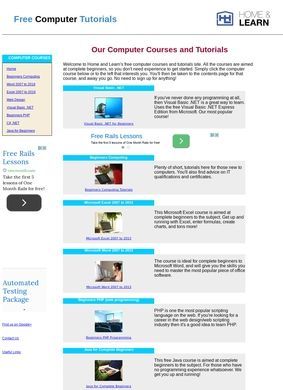
Visual Basic .NET is the headline course here, which tells you something about the age and priorities of Free Beginners Computer Tutorials and Lessons. This is a self-study site at homeandlearn.co.uk that teaches programming and office software to people starting from zero, and it leads with VB.NET as its most popular track. That choice feels out of step with where most beginner coders point themselves now, yet it also shows that Free Beginners Computer Tutorials and Lessons was built by someone who taught this material and kept the lessons that worked.
Programming languages and office software
The catalogue is wider than the front choice implies, and this is where Free Beginners Computer Tutorials and Lessons starts to justify the time. On the programming side there is C# .NET, Java, JavaScript, Python, PHP, and Android development. Web work is covered through HTML, HTML5, and CSS. For people who never intend to write a line of code, there is a separate run of Microsoft Office training spanning Excel, Word, Access, and Power BI, plus more specialised material like Pandas for data analysis and Excel VBA programming. General computing basics sit underneath all of it for anyone who needs the ground floor first. The VB.NET course leans on Microsoft's free Visual Studio Community Edition, so a learner is not asked to buy anything to follow along.
Text based lessons with screenshots
Everything across Free Beginners Computer Tutorials and Lessons is text with screenshots. No video, no interactive sandbox, no quizzes that grade you. For some people that is a downgrade; for others it is exactly right: you can read at your own pace, copy code into your own editor, and skim back to a step you missed without scrubbing through a clip. The screenshots earn their place, because a beginner who cannot find the right menu in Visual Studio is stuck, and a picture of the actual button solves that faster than three paragraphs of prose. The format is honest in a way many polished course platforms are not, since it makes no pretence of being more than a careful written walkthrough.
Where is the Excel VBA course located?
There is one structural quirk worth flagging. The Excel VBA course does not live on the main domain at all. It sits on a companion site, homeandlearn.org, which can be confusing when you arrive expecting one tidy hub and find part of the material parked next door. It works, but it is a seam in what otherwise reads as a single coherent body of tutorials, and a first-time visitor to Free Beginners Computer Tutorials and Lessons may not realise where the spreadsheet macro lessons went.
Free access without registration
The access model is the standout feature. All of it is free, and none of it asks you to register. No account wall, no email capture before lesson one, no trial that quietly converts. For a complete beginner who is not yet sure whether programming is for them, that removal of friction is the whole point. They can open the JavaScript lessons on a Tuesday, decide it is not for them, and wander into the Excel material instead without ever having handed over a detail. Free Beginners Computer Tutorials and Lessons treats the visitor as someone trying things out, not as a lead to be converted. That posture is increasingly rare, and it is what separates Free Beginners Computer Tutorials and Lessons from the free-tier trap that many sites in this space have quietly become.
Safety and traffic verification
The reputation side of Free Beginners Computer Tutorials and Lessons is quieter, and that cuts both ways. No user-review counts or star ratings turned up on Google, Trustpilot, Yelp, or any of the usual platforms. That absence is less damning for a free educational resource than it would be for a paid service listed in a business directory, because most readers finish a lesson and move on without writing about it publicly. What does exist around Free Beginners Computer Tutorials and Lessons is technical rather than human: Scamadviser rates the domain as legitimate and safe after automated checks across forty technical factors, and Webrate.org flags it as safe too. Traffic estimates put it around sixty thousand visits a month, pointing to a steady stream of people finding it useful, even if almost none of them leave a public verdict.
Limited contact options for learners
The contact picture at Free Beginners Computer Tutorials and Lessons is spare. There is no published phone number and no physical address. The only route is an email address mentioned on the site, with no form or support page behind it. For a free, one-person-feeling teaching resource that takes no payments, that is more forgivable than it would be for a commercial operation; there is nothing to dispute and nothing to chase. Still, anyone hoping to get a stuck-lesson question answered should set expectations accordingly. This is a place to read and learn, not a place that promises a support desk.
The breadth is the quiet strength of Free Beginners Computer Tutorials and Lessons. Few free resources cover both the coding side and the office-software side under one roof, and fewer still let a curious person cross between them without friction. Someone who came for Python might discover the Power BI material and stay; someone who arrived to fix a spreadsheet problem could end up writing their first macro. That cross-pollination is hard to engineer, and Free Beginners Computer Tutorials and Lessons achieves it by simply keeping everything open and adjacent.
Who benefits most from this resource
A genuine beginner who learns well from reading, wants to try several languages without paying, or needs to get a handle on Excel and Word without sitting through a paid course will get a lot from Free Beginners Computer Tutorials and Lessons. The screenshots, the open access, and the range of subjects all reward the patient reader who is happy to work at the keyboard. Someone who needs structured video, graded exercises, a certificate, or hand-holding when they get stuck will find the format too bare. The .NET-heavy lineup also means the freshest, most market-driven languages are present but not always the loudest part of the offering, so a learner chasing the current job market should check that the specific track they want is as developed as the VB.NET one.
The safety checks and the steady traffic at Free Beginners Computer Tutorials and Lessons confirm it is neither abandoned nor sketchy, and the absence of any human reputation trail is the main thing that tempers an otherwise solid record. It is a generous resource that shows its age in places, does not oversell itself, and is exactly what it says it is.