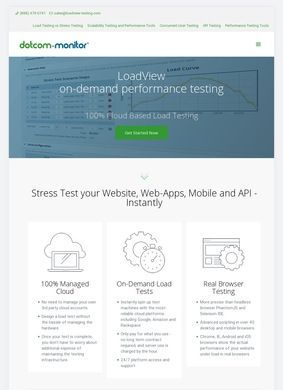
One team is two weeks out from launching a campaign, the marketing push is set, and nobody can say with confidence whether the checkout flow will hold up when forty thousand people hit it at once. That uncertainty is the exact spot where Loadview-testing.com tries to be useful. It is a cloud-based load and performance testing platform built by Dotcom-Monitor, and the pitch is straightforward: throw realistic, heavy traffic at a website, web app, API, or streaming setup, watch where it buckles, and fix the bottleneck before customers ever see it.
Real browser testing across devices
What separates Loadview-testing.com from the simpler stress testers is that it drives real browsers rather than raw HTTP requests. The platform can generate load across more than forty browser and device types, including Chrome, Firefox, Android, iOS, and even Internet Explorer, so the numbers you get back reflect how an actual user agent renders and executes a page, scripts and all. For anything with a JavaScript-heavy front end, that distinction is the whole point. A protocol-level test can tell you the server answered; a browser-level test tells you the page actually worked under pressure. Loadview-testing.com leans hard into the second kind, and that is the reason an enterprise team would pick it over a barebones alternative.
Script user journeys without code
Building the test scenarios looks approachable, at least on paper, and this is where Loadview-testing.com earns some patience from non-developers. The EveryStep Web Recorder lets you script multi-step user journeys without writing code, clicking through a login, a search, an add-to-cart, and replaying that path under load. Teams that already live in code are not boxed out either: the platform takes Selenium-based scenarios, imports Postman Collections, and runs existing JMeter scripts, so work you have already invested in does not get thrown away. API coverage spans both REST and SOAP with response validation. Proving that a backend service keeps returning correct data, and not a fast 200 while the payload quietly goes wrong, is exactly the use case that layer handles.
Load generation from forty locations
The geographic side is one of the more genuinely practical features Loadview-testing.com offers. Load can be generated from more than forty locations worldwide, so a business serving customers across regions can see how latency and capacity shift depending on where the traffic originates. Pair that with the choice between step-based, goal-based, and dynamically adjustable load curves, and you can model a slow ramp, a sudden spike, or a sustained plateau depending on what you are actually worried about. Loadview-testing.com also includes an on-premises deployment option for testing internal applications, which lets organizations push load against systems that never face the public internet without routing that traffic outside their own walls. Banks, insurers, and government teams tend to care about that detail a great deal.
Enterprise and government focus
On the question of who this is built for, the answer is fairly clear and Loadview-testing.com does not pretend otherwise. The platform points itself at enterprise organizations, managed service providers, and teams in financial services, government, education, insurance, e-commerce, and healthcare. The CI/CD pipeline integrations reinforce that, slotting performance checks into a DevOps release process so a failing load test can gate a deployment the same way a failing unit test would. This is tooling aimed at groups that ship continuously and cannot afford to discover a scaling problem in production.
Pricing starts at $199 monthly
Pricing is where the audience question for Loadview-testing.com gets answered a second time, less gently. Plans start at $199 a month, and that floor tells you plainly that small shops and solo developers are not the target. A free trial does exist, covering up to five tests with no credit card required, which is enough to record a scenario, run it, and judge whether the browser-based results justify the spend. Five real tests give you a genuine feel for the product instead of a crippled demo, which makes the trial actually worth running. Still, the monthly entry cost is steep if your needs are occasional, and the brief itself notes that the pricing can be prohibitive for smaller teams. That is a fair caveat to carry into any decision here.
Contact and support channels
Contact information on Loadview-testing.com is handled the way a serious B2B vendor should handle it. The homepage carries a toll-free phone number, a direct sales email, and a physical address in Excelsior, Minnesota, alongside a dedicated support page. None of it sits behind a form gate or a vague "request a demo" wall. For an enterprise buyer who needs to know there is a real company and a real support channel before authorizing spend, that visibility does a lot of quiet reassurance work. A street address and a phone number you can actually dial still count for something.
Third-party ratings and reviews
Third-party reviews back the platform up reasonably well. Loadview-testing.com carries around 116 reviews on G2 and 26 on Capterra, where it holds an overall 4.5 out of 5, with ease of use at 4.4, customer service at 4.6, features at 4.5, and value for money trailing a little at 4.0. On PeerSpot, listed under its Dotcom-Monitor LoadView name, it averages about 9.0 out of 10. Those are solid numbers spread across three independent platforms with different reviewer bases, not a single curated source with a handful of entries propping up the score. The lower value-for-money score lines up with the pricing concern, which is the kind of internal consistency that makes the rest of the ratings easier to trust.
The user complaints aimed at Loadview-testing.com are worth taking at face value, because they are specific rather than generic grumbling. Slow test initialization comes up: spinning real browsers across many distributed locations takes setup time, and people who expect instant results notice the wait. The pricing objection recurs too, mostly from smaller teams who find the value harder to justify at the entry tier. Neither of these undercuts the core engine; they are friction points around a capable product, and knowing about them in advance is more useful than a wall of five-star praise would be.
Weighing it as a whole, Loadview-testing.com reads like a mature, focused product instead of a hopeful startup feature list. The real-browser testing, the forty-plus geographic origins, the no-code recorder paired with Selenium and JMeter support, and the on-premises option add up to a toolkit that covers the awkward cases most teams hit only once they are already in trouble. The Dotcom-Monitor backing gives it a track record, and the third-party ratings are consistent and credible across multiple platforms. What you are buying is depth and realism in the testing, with the trade-off being a price that assumes you have real scale to protect.
Loadview-testing.com makes a strong case for enterprise teams and MSPs that push meaningful traffic and treat a launch-day outage as a serious cost. The credibility around the platform is intact: the feature set runs deep, the outside ratings are consistent, and the complaints that do exist are specific enough to plan around. The picture is murkier for a small team running an occasional check, where the monthly minimum and the initialization lag may outweigh the polish. If your traffic is modest and a performance problem would be more inconvenient than catastrophic, the entry price will be hard to justify. If the stakes are higher, the platform has enough substance behind it to earn a serious evaluation.
Business address
LoadView