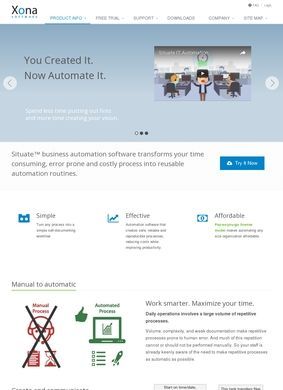
A batch job fails at two in the morning, nobody knows until customers complain, and the engineer on call spends an hour piecing together which script broke and why. That is the kind of mess Situate, the flagship product from XonaSoftware, sets out to prevent. It is a workload automation and orchestration platform aimed at IT and operations teams who run a tangle of jobs across Linux, Windows, and macOS machines and need those jobs to run in order, on time, and with a clear record of what happened.
Automation without coding expertise
The pitch from XonaSoftware is automation without forcing everyone to become a scripting expert. Situate is built around a visual workflow engine that leans on a no-code and low-code approach, so a person can assemble a sequence of tasks by wiring them together instead of hand-coding every dependency. For teams that already live in shell scripts and scheduled tasks, the appeal is moving that logic somewhere it can be seen, edited, and handed off without a tribal-knowledge crisis every time someone leaves.
Event-driven scheduling triggers
Scheduling is where XonaSoftware has put real thought into the triggers. A job can fire on a clock, but it can also start from an incoming email, the arrival of a file, a manual push, or the completion of another workflow. That event-driven model is the difference between automation that stays accurate and automation that quietly drifts out of sync: a file lands in a folder, a report needs to follow, then a notification goes out, chained on conditions, not padded with guessed time gaps.
Monitoring dashboards for running jobs
Around the engine sit the operational pieces that decide whether a tool survives contact with a busy team. XonaSoftware includes real-time job monitoring and a set of visibility dashboards, so an operator can see what is running, what finished, and what stalled without digging through log files on separate hosts. Jobs are described as self-documenting, which, if it holds true in practice, addresses one of the oldest headaches in this field: the automation nobody dares touch because the person who built it left and never wrote anything down. XonaSoftware also ships a library of out-of-the-box tasks, giving teams a running start instead of a blank canvas.
AI-assisted operations through MCP
One detail worth flagging is the MCP interface introduced in version 2.2. Model Context Protocol support lets AI tools drive Situate directly: read logs, dig into an outage, and run workflows on command. XonaSoftware frames this as AI-assisted operations. Features bolted on to ride a trend deserve skepticism, but giving an AI assistant structured, programmatic reach into a scheduler is a sensible fit, since outage triage and log-reading are exactly the grunt work where that kind of help pays off instead of dazzles.
Comparing trial support and training options
XonaSoftware does not hide the product behind a sales wall. There is a free trial in the form of a downloadable installer, which is the right call for infrastructure software, where buyers want to run it against their own systems before they commit internal resources. Alongside the trial, XonaSoftware offers professional training and custom development services, a combination that points to organizations expected to embed Situate deeply and wanting help shaping it to their environment instead of downloading and walking away.
Checking the documentation portal
Supporting all of this is a separate documentation portal at the docs subdomain, which is a good sign for a technical product. A scheduler with no readable reference is a scheduler that ends up misused, so a dedicated docs site from XonaSoftware tells you the company expects administrators to read, configure, and troubleshoot on their own and not open a ticket for every configuration question. The main site rounds things out with a features page, release notes, an evaluation and download section, and a blog. The press releases lean toward incremental version announcements, with point updates like 1.11.3 and 1.7.1 noted, which reads less like marketing theater and more like a team that ships steadily and writes down what changed.
That cadence is its own quiet argument. Version numbers climbing in small, frequent steps tend to come from products in active maintenance, not abandonware dressed up with a fresh homepage. For software meant to run unattended in the middle of the night, evidence of ongoing upkeep from XonaSoftware counts for more than polished copy.
On the practical side of trust, the picture is mixed but not alarming. XonaSoftware provides a contact page and links out to Twitter or X, Facebook, and LinkedIn, so there are routes to reach the company and channels where it maintains a presence. What is absent is a phone number or a physical street address anywhere on the public site; email runs through the contact form, with no published address. For a US-based software vendor that mostly sells and supports remotely, routing everything through a form is common enough. Still, an engineering manager weighing a tool that will run production jobs may want a phone line or a named office visible before approving the tool, and that information is not on display.
Weighing reputation and contact gaps
The reputation side is harder to read, and honesty demands saying so. No notable third-party reviews turned up for XonaSoftware or for Situate specifically. Searches tend to surface an unrelated firm, Xona Systems, a zero-trust remote-access vendor with nothing to do with this product, so anyone researching should be careful not to conflate the two. The absence of an outside review trail is not a red flag on its own. Workload automation is a niche bought by IT departments, not a consumer app that collects star ratings, and tools in this corner often live or die by word of mouth and proof-of-concept trials. It does mean a prospective buyer has to lean on the free trial and the documentation to form a judgment, since crowd-sourced opinion is not there to lean on.
What XonaSoftware presents overall is a focused, technically credible product with a clear idea of who it serves. The gaps are in the surrounding picture: the missing phone number and the quiet review trail. The offering itself is described with specificity that comes from a team that knows the problem space, and the steady release history backs that up. XonaSoftware has clearly put more investment into the product than into its public profile, which is a reasonable trade-off for software sold to infrastructure teams through proofs of concept, not impulse downloads.
An IT or operations lead juggling cross-platform jobs and tired of brittle cron entries should download the free trial from XonaSoftware, point it at a non-critical workflow, and read through the docs portal to see how the event triggers and monitoring perform against a real environment. If MCP-driven automation is on the roadmap, it is worth probing how the version 2.2 interface behaves under load before building production workflows around it.
Business address
XonaSoftware, Inc
411 Burlington Ave,
Clarendon Hills,
Ilinois
60514
United States
Contact details
Phone: 312-881-8181