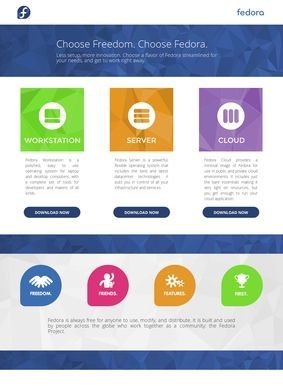
Fedora Project splits itself into distinct editions, and that decision shapes almost everything about how it reads from the outside. Workstation ships with GNOME for people who want a working laptop without configuration overhead. Server is its own download. Cloud and CoreOS cover container and infrastructure work, with CoreOS built specifically around container-optimized deployments. IoT rounds out the lineup for smaller devices. None of this is bolted on after the fact; each edition is a deliberate build with its own purpose and its own release path.
Editions for different use cases
Beyond the headline editions there is a deeper catalogue that rewards some digging. The Atomic Desktops line covers Silverblue, Kinoite, Sway Atomic, and Budgie Atomic, all of which take an image-based, immutable approach to the desktop. The Spins offer the same underlying system in alternative desktop environments: Xfce, Cinnamon, MATE, LXQt, i3, and Phosh. KDE Plasma gets its own desktop edition rather than being buried in a sub-menu. If you have ever had a desktop-environment argument with someone, the answer here is to pick yours and move on. Everything is a free download, and Fedora Project carries Digital Public Good certification, which says something concrete about how it is governed and distributed beyond the publisher's own claims.
Alternative desktops and image-based systems
This is where Fedora Project stops looking like a download page and starts looking like infrastructure for running a community. Contributors get Fedora Accounts as a single identity, Bodhi for managing updates, and Koji as the build system that compiles packages. There are GitLab repositories, a package submission pipeline, and contribution guidelines that go well past code: documentation, translation, and design are all named as ways in. The impression after reading through how the pieces connect is of tooling built by people who do this work daily, not assembled to look complete on a features page.
Build tools for contributors
The community channels are equally concrete. Ask Fedora runs as a discussion forum, Fedora Chat is Matrix-based, and there are mailing lists for people who still prefer email-driven coordination. Documentation lives at a separate dedicated docs site, which keeps reference material away from the marketing surface. The annual Flock conference and local release parties give Fedora Project a real-world rhythm, which keeps volunteers engaged across a regular release cadence.
Community forums and documentation
One detail worth noting for any technical reader: Fedora Project is the upstream source for Red Hat Enterprise Linux. That relationship explains a lot about how the project moves. Features and packages often land in Fedora first, get tested by a large user base, and later inform what becomes a paid enterprise platform. For a developer or administrator, running Fedora Project is a fairly direct way to see where the wider Red Hat ecosystem is heading before it gets there.
Upstream source for Red Hat Enterprise Linux
The Labs are the clearest sign that Fedora Project knows its audience is not one homogeneous crowd. These are purpose-built configurations aimed at specific work: astronomy, design, gaming, audio production, security testing, and scientific research. Instead of handing someone a blank install and a wiki page on what to add, a Lab ships with the tools for that field already assembled. An audio producer and a penetration tester are downloading very different systems, and Fedora Project keeps those paths separate instead of merging them into one crowded installer.
Labs for specialized work
Desktop users have several polished entry points. Developers get build tooling, repositories, and a transparent path to contribute. System administrators and cloud operators have editions shaped around servers, containers, and immutable hosts. Specialists have the Labs. Translators and designers have a stated role. That range is genuinely hard to assemble and harder to keep coherent across many years of releases. Fedora Project manages it through clear separation, avoiding the bloated single-image approach that tries to please everyone, and the result is a project that stays legible even when you are only using one small corner of it.
Where should you start with Fedora?
A search for third-party ratings turns up active discussion on Reddit and Stack Exchange but no aggregated scores on the usual review platforms, which is not unusual for a free infrastructure project versus a commercial product. The evidence that Fedora Project has traction is in the contributor count, the release history, and the RHEL upstream relationship. A developer who works near the Red Hat world should install Fedora Project on a spare machine or a virtual host to observe upcoming RHEL behaviour early. Desktop newcomers should start with Workstation or the KDE Plasma edition and ignore the rest until they know what they need. People curious about contributing should head to the documentation site and Ask Fedora, set up a Fedora account, and ask where help is needed in translation or design before writing any code.