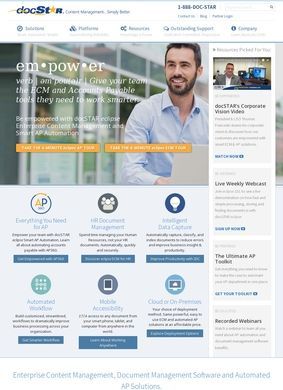
What a company filed under conferences and events actually sells is not always obvious from the label. In the case of docStar, nothing to do with conferences. The site belongs to an enterprise content management and process automation platform, so the category label is plainly a misfile. Set that aside and the offering underneath is specific enough to judge on its own terms: software for capturing, routing, and storing the documents that accumulate in any organization running a serious volume of paperwork.
Document capture and workflow automation
The pitch is built around getting paper and PDFs out of inboxes and filing cabinets and into a system that can read them, route them, and retrieve them later. Document data capture and extraction sit at the front end, pulling fields off invoices and forms so a person does not have to retype them. From there, docStar relies on workflow automation to move each document through an approval chain, with a centralized repository keeping everything searchable and auditable. It is unglamorous back-office infrastructure that pays for itself only if the automation holds without cracking under daily volume. The docStar interface follows the pattern typical of mature enterprise tools: dashboards, queue views, and audit trails rather than anything particularly inventive, but function is what buyers in this category are paying for.
Accounts payable and HR use cases
Two use cases get the spotlight, and both are sensible places for this sort of tool to earn its keep. Accounts payable automation is the headline: invoices come in, get matched, and route for approval without someone shuffling them by hand. AP is the textbook ECM entry point because the savings are straightforward to count, so docStar leading with it reflects where the product genuinely fits. Finance teams can see a return on investment relatively quickly, which makes the initial sales conversation easier than it would be for a broader platform pitch.
Employee onboarding workflows
The second pillar is HR automation, built around employee onboarding and compliance. New hires generate a stack of forms and signatures, and keeping those organized and auditable is a real headache for any growing organization. Wrapping onboarding paperwork into the same capture-and-workflow engine is a natural extension of the AP story, and it widens docStar's appeal well beyond finance departments. Companies that start with one function often adopt the other once the platform is embedded in their process.
Around these two anchors, the feature list fills out with security controls, compliance tracking, third-party integrations, and reporting. Those are the practical questions any buyer raises once the core function is understood: can it lock down sensitive records, will it connect to the ERP already running in the building, and can someone in management see what is happening across the approval queue. docStar offers both cloud and on-premises deployment, which is directly relevant for firms in regulated industries that cannot put everything in someone else's data center.
Industry-specific solutions
docStar does not stop at generic feature descriptions. The site carries solution pages aimed at specific sectors: accounting, distribution, insurance, manufacturing, trucking, and utilities. That spread tells you who the platform is really chasing, and it is a credible list. These are paperwork-heavy industries where invoices, bills of lading, claims, and compliance records pile up fast, and where the return on automating that flow is easiest to demonstrate to a skeptical budget holder. Tailoring the message to a trucking dispatcher versus an insurance underwriter is more work than a single brochure page, and it points toward a company that has genuinely sold into these verticals rather than just listing them for optics.
On the proof side, docStar claims more than 4,000 customers and cites figures of 40 percent higher productivity, 30 percent lower costs, and 75 percent fewer errors. Vendor-supplied metrics like these always deserve a skeptical read, since they tend to come from best-case deployments and rarely show the underlying methodology. The customer count is the more interesting figure. Four thousand installations is a meaningful footprint for business software in this space, and it lines up with a product that has been in the market long enough to build out sector-specific content and case material.
Customer resources round out the public pages. ECM purchases are not impulse decisions. They involve IT review, process mapping, integration scoping, and often a structured pilot. A site that anticipates that scrutiny with case material is doing its job, and docStar handles this competently without overselling what the software can do.
Customer reviews across multiple platforms
The review record for docStar is unusually thorough for a back-office product. It appears on G2, Capterra, Gartner Peer Insights, SoftwareReviews, Software Advice, and SoftwareSuggest, so a prospective buyer has a reasonable volume of independent reading to draw on. SelectHub aggregates 238 user reviews across three platforms and puts user satisfaction at 76 percent, which it rates as good. FeaturedCustomers lists 94 customer reviews alongside 69 case studies. That is a wide and consistent presence across the platforms that B2B buyers actually check when building a shortlist, and docStar's standing in this business directory of evaluated vendors is better documented than a large share of competitors at this price point.
The 76 percent satisfaction figure lands in honest middle territory. Most users are content and some are not, which is a normal distribution for mature enterprise software that has to accommodate many different document workflows and organizational quirks. Nobody reading those reviews should expect perfection, but the volume of feedback means the picture is well-tested and not built on a handful of sympathetic outliers. That kind of depth takes years to accumulate and is worth considerably more to a prospective buyer than a perfect score sitting on twenty reviews.
Contact and implementation support
Contact information is easy to track down: a toll-free phone number, a direct email, and a physical office in Austin, Texas. For software that a finance or IT team will need to work through with a salesperson and an implementation specialist, having a staffed phone line and a real address on display removes a layer of uncertainty that some competitors in this space leave unanswered.
docStar competes directly with vendors like DocuWare for AP-automation buyers in mid-market companies. Against that kind of rival, its case rests on a broad independent review trail, sector-specific solution pages, and a customer count large enough to add credibility to the published metrics. Whether the platform wins against a specific alternative depends on integration fit and pricing, but docStar brings enough to the table to belong on any serious shortlist in this category. The evidence on the site is unusually complete, and the review platforms give a realistic picture of what the software actually delivers.