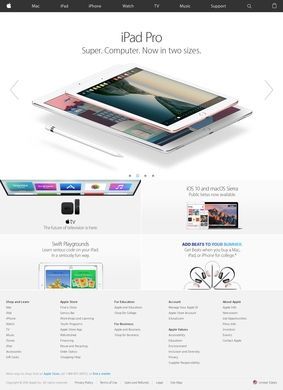
Think of a phone that has stopped holding a charge, a laptop too slow to open a spreadsheet, a tablet bought for a child who is now in college: most people land on Apple Inc. with a specific device problem and a budget in mind, not a wish to browse. The site is built around that arrival. Pick iPhone and you are walking through the current lineup, the iPhone 17 and the iPhone 17 Pro, with the differences laid out before any checkout step. Pick Mac and the same logic applies across the MacBook Air with the M5 chip and the MacBook Pro in its M5, M5 Pro and M5 Max configurations. The structure assumes you know roughly what you came for and want to compare specs without three pages of preamble first.
Beyond the iPhone and Mac lineup
The hardware range from Apple Inc. goes well past the headline products. There is the iPad Air on the M4 chip, the Apple Watch Series 11, AirPods Pro 3, and the Apple Vision Pro, the mixed-reality headset that sits at the experimental end of the catalogue. AirTag trackers cover the small, practical end, the kind of thing you add to an order to keep tabs on keys or luggage. Each product page on Apple Inc. tends to give the technical detail a buyer needs to choose a size, a chip tier, or a storage option, and the comparison tools do real work when two models look similar on the surface.
Underneath the devices sits the software that ties them together: macOS, iOS, iPadOS, watchOS, and visionOS. This is relevant for anyone weighing whether to buy a single product or commit to the wider system, because the operating systems are what make a watch talk to a phone and a phone hand off to a Mac. Apple Inc. treats these platforms as part of the product, updated and documented on the same site, so a shopper can read about what the software does before deciding how deep to go.
Software linking every device
It does, and the services layer is where that becomes obvious. Apple TV+ carries original video and now live sport, including MLB, MLS and Formula 1, which pulls it out of the pure back-catalogue streaming bracket. Music handles audio, Arcade covers gaming across mobile and desktop, and Fitness+ runs guided workout videos that lean on the Watch for heart-rate data. Round it out with News+, Podcasts, Books, and the App Store, and the spread is wide enough that most people will already touch two or three of these without thinking of them as separate purchases.
For anyone who finds juggling those subscriptions tedious, the Apple One tier bundles several services into a single bill, which is the sensible route once you are paying for more than a couple individually. It is the sort of consolidation Apple Inc. has leaned into across its lineup, and here it spares the buyer from tracking five separate charges. The financial side is built out too. Apple Pay handles digital payments, Cash moves money between people directly, and the Card offers up to 3 percent Daily Cash back. None of this is presented as a side note; the site gives payments and credit their own proper sections, so a shopper can read the terms before opting in.
Streaming and financial services
Support is the part that often decides whether a big purchase feels safe, and Apple Inc. invests in it heavily. The support hub covers setup guides, repair options, warranty terms and software troubleshooting across every product category, organized well enough that most common questions resolve without a phone call. Documentation for older devices stays accessible alongside current models, which is useful when a household runs a mix of generations. The depth of that resource is something Apple Inc. has kept current through repeated hardware cycles, and it translates to a buyer being able to self-diagnose before spending anything.
Inside the support hub
The money-saving and lifecycle programs deserve a mention because they change the real cost. The trade-in program offers credit toward a new device, up to 695 dollars depending on what you hand over, and certified refurbished sales from Apple Inc. let buyers get current-generation hardware at a lower price with a warranty attached. Financing options and carrier deal promotions sit alongside, so the sticker price is rarely the figure you actually pay. For a household replacing several aging devices at once, those levers add up quickly, and the site keeps them visible instead of buried.
Trade-in credit lowers costs
Worth noting is how deliberately Apple Inc. segments its buyers. There are dedicated purchasing programs for businesses, for K-12 educators and students, for college students, for healthcare professionals, and for government and military personnel. A teacher buying classroom iPads is not pushed through the same path as a consumer grabbing AirPods, and the pricing and bulk options shift accordingly. That kind of audience-specific setup is the difference between a catalogue that lists everything and a site that actually knows who is shopping.
If there is a fair caution, it is that the breadth can overwhelm. Someone who wants only a charging cable has to pass through a lot of ecosystem before reaching the accessory. The flip side is that the depth is genuine: the configuration choices, the comparison tables and the trade-in calculators are functional tools, not decoration, and they reward a buyer willing to spend a few minutes. Apple Inc. has built the site for people who intend to make a considered decision, and it rewards that patience with enough detail to get the call right.
Programs for specific buyer groups
It is also worth being honest about what this site is and is not. It is a sales and support hub for one company's products, so everything is framed to keep you inside the system. That is not a flaw, it is the point, and a reader who already owns an iPhone and a Mac will find the integration genuinely useful. A reader shopping platform-agnostic should know going in that the comparisons here are between its own devices, not against rivals.
For a shopper standing at the upgrade decision, weighing a new iPhone or Mac against the cost of keeping an old one, Apple Inc. is the right place to do the homework: the spec detail, the trade-in credit and the financing terms are all in one place. Run your current device through the trade-in estimator before pricing anything new. The number it returns, set against the configuration cost of the replacement, usually makes the decision less ambiguous than it felt going in.