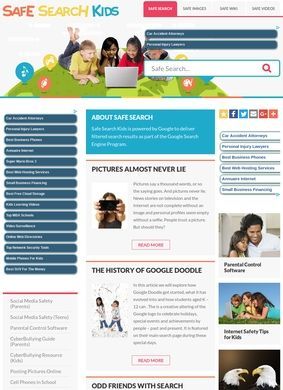
Imagine a nine-year-old typing a harmless-sounding word into a regular search box and landing on something a parent would never have chosen. That is the exact moment Safe Search for Kids is built around. The site puts a filtered search bar front and center, running queries through Google's SafeSearch layer so the results that come back are scrubbed of the worst material before a child ever sees them. It is a small idea executed cleanly, and the value is obvious to anyone who has watched a kid navigate the open web unsupervised for the first time.
Filtered searches by content type
The search side of Safe Search for Kids is broader than a single box. Alongside the standard web search there are separate tools for images, video, and a kid-oriented Wikipedia called Search Wiki Kids that pulls filtered encyclopedia content. There are also dedicated safe searches for games, news, and apps, each one channeling queries through the same filtering approach so a child looking for a game is not one mistyped term away from something inappropriate. Splitting these out by content type is a sensible call, because the risks of an image search differ a lot from the risks of a text search, and a single filter rarely handles both equally well.
Articles for parents and teachers
What gives the site more substance than a row of search widgets is the writing that sits behind them. Safe Search for Kids publishes a fairly deep library of editorial content aimed at parents and teachers, grouped into areas like internet safety and cybersecurity for families, parenting and child development, social media safety, and parental controls for managing devices across different platforms. There is material on digital literacy too, plus some broader home and outdoor safety coverage that stretches past the strictly online remit. Individual pieces tackle concrete questions: how accurate AI detectors really are, how online scams work, how to handle screen time, how to plan for summer safety. These read as practical guidance someone can act on, not padding written to fill a page.
Taken separately, the search tools alone would make Safe Search for Kids a utility you bookmark and forget. The articles turn it into something a parent or teacher might return to when a specific worry comes up, whether that is a child asking for a social media account or a classroom needing a sane way to let students research online. A teacher pointing a room full of students at a filtered search engine, then reading up on parental controls for the school's tablets the same evening, is squarely the kind of person Safe Search for Kids is set up to help.
How the site is organized
The guidance is organized clearly enough that finding the right topic does not take much hunting, and the articles tend to stay on the practical side, explaining what a control does and how to switch it on rather than circling the subject in vague terms. Pairing the doing tool with the learning content is the smarter version of either one on its own.
Ad-supported model and transparency
On who stands behind it, Safe Search for Kids describes itself as an independent educational website serving parents, teachers, and students, and it runs on advertising. There are no physical products for sale and no subscription tier pushed at the visitor, at least nothing visible from the homepage. The ad-supported model is worth naming plainly, since a free child-safety tool has to pay for itself somehow, and ads are a more honest trade than a paywall hiding the actual filtering behind a monthly charge. A reader should expect to see advertising on the page, and that is the cost of the tools being free to use.
Contact and support options
Contact for Safe Search for Kids runs through a contact page at the site, which is the right place for it. The homepage itself does not put a phone number, an email, or a mailing address in front of you; you have to click through to reach the contact route. For an independent web publisher of this kind that is normal and not a strike against it, though a visitor who wants to reach a human should know the path runs through that page and not the front door. There is at least a clear channel, which is more than some sites in this corner of the web bother to provide, and the form covers the practical need to send a question or report a problem.
Where does Safe Search for Kids appear online?
Reputation takes some digging for Safe Search for Kids, and it is worth being direct about what that search turns up. No direct user reviews of safesearchkids.com appeared in third-party results, so there are no star ratings or review counts to point to. The site does get named in roundup articles about child-safe search tools, including pieces from WeAreTeachers, GIGABIT, and Common Sense Media, which puts it in respectable company and indicates that people who cover this space consider it worth listing. That is editorial mention rather than crowd-sourced rating, and the two are not equivalent.
Beware the Chrome extension confusion
One caution worth flagging: a Chrome Web Store extension called Safe Search holds a strong five-star average, but it is a separate product with no connection to Safe Search for Kids, so anyone relying on those stars as a vote of confidence here would be misreading them. The two share part of a name and nothing else, and conflating them gives the site credit it has not actually earned from users.
So the credibility of Safe Search for Kids rests less on a wall of testimonials and more on the work itself, which is a reasonable footing for a tool of this type. The filtering does what it says, the editorial library is genuinely useful, and the independence of the operation is stated openly. The lack of visible reviews is a real gap for a cautious parent who wants social proof before trusting a search engine with their kid, and it is fair to weigh that against the site when deciding how far to lean on it. None of that undercuts the basic usefulness, but it does mean a first-time visitor is judging the tools on their face instead of on a track record other parents have vouched for.
Comparison with Kiddle
Set next to Kiddle, the Google-powered kids' search engine that many parents reach for first, Safe Search for Kids covers a wider field. Kiddle does the filtered-search job well and presents it in a bright, child-friendly wrapper, but it stays mostly a search box. Safe Search for Kids matches it on the core filtering across web, images, and video, then adds the games, news, app, and Wiki searches plus a substantial body of guidance for the adults doing the supervising.
Choosing between the two tools
For a parent who wants only a safe search bar to hand a young child, Kiddle is the simpler pick. For a parent or teacher who also wants to understand screen time, scams, and parental controls in one place, Safe Search for Kids gives more to work with, and that breadth is the stronger reason to keep it open in a tab.