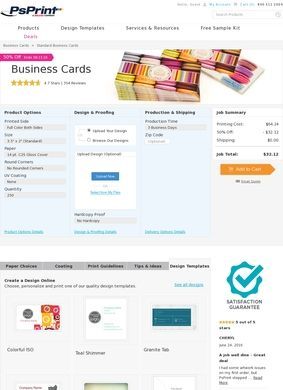
How much can you change about a rectangle of card stock before it stops being a standard business card? On the PsPrint business cards page the answer runs long. Printed sides range from color on the front with a blank back, to color front with a black back, to full color on both. Trim can be a plain rectangle or a square, with standard corners or a 1/8 inch round. Sizes cover the usual 3.5 by 2 inch card plus a 3.5 by 1 inch slim, a 2 by 2 mini square, and a 3.5 by 3.5 jumbo square.
That is the first screen, before you have touched paper. Quantities start at 50 and climb to 10,000, so the same page serves a freelancer ordering a first small batch and a company reprinting for a whole sales team. PsPrint is an online custom printer, and the business cards section is a fair sample of how the whole operation thinks: hand the buyer the knobs and let them turn them, with no quote form standing in the way.
The customer PsPrint is built for is clear enough from the layout: a small business or a marketing team that knows roughly what it wants and would sooner drive the order itself than sit through a sales call. The catalogue assumes some fluency. Someone who has never specified a print job may find the sheer number of options more daunting than helpful at first, though the free sample kit and the on-site design help take the edge off that.
Configuring a card on PsPrint
The build works as a stack of choices, each one narrowing the last. None of it requires a phone call, which is the appeal of ordering from PsPrint for anyone who would rather place a job at eleven at night than wait for a sales rep to email back. The trade is the usual one for self-service printing: the control is yours, and so is the responsibility for getting the file right.
That kind of front-loaded detail is not universal for a print vendor. Plenty of a similar company's site amounts to little more than an entry in a business directory, a name, a phone number, and a request-a-quote button, with the real options only surfacing after a human gets involved. PsPrint puts most of that decision tree on the page itself, before anyone has to pick up a phone.
Paper stocks, sizes, and finishes
Stock is where the choices get interesting. The list on PsPrint runs through 14 point gloss, 13 point matte, a 13 point recycled matte for buyers who care about that, 16 point gloss for something heavier, a 15 point velvet or soft-touch velvet, and several 100 pound linen variants. A designer who already knows the difference between soft-touch velvet and linen will find the exact line they want; a first-timer may need to order the free sample kit to feel the stocks in hand before choosing. That is the move I would make ahead of a run of several thousand.
UV coating is offered on top of the stock, and packing options control how the finished cards arrive. These are the details that separate a card that feels considered from one that feels cheap, and the page lets a buyer set them deliberately instead of accepting a default. A slim 3.5 by 1 card on heavy linen reads very differently from a jumbo square on gloss, and the configurator lets both exist.
Quantities deserve their own note. A floor of 50 keeps the door open for someone testing a design before scaling up, and a ceiling of 10,000 covers a full company rollout, so the same page carries a job from first draft to bulk reorder. Few buyers will ever touch both ends of that range, but having them on one page means a growing business does not have to switch away from PsPrint as its needs change. It is the kind of span that suits a company planning a few steps ahead.
Uploading art, proofing, and production time
Artwork can go up through a direct design upload, be built on the site with a self-service artwork tool, or be picked from a browse-designs gallery for people starting from nothing. Layout guidelines and file-setup resources sit alongside, and skipping them is asking for trouble. A card kicked back at prepress for a bad bleed is the classic way an online print order goes sideways.
PsPrint also offers an optional hardcopy proof, a physical sample mailed out before the full run commits. That costs time and usually a little money, but for a color that has to match a brand exactly it is far cheaper than reprinting ten thousand cards after the fact. Production time is a selectable 1 to 5 business days, so a rush order and a patient one each pay for what they need and nothing more.
The spread of entry points is worth naming. A confident designer uploads a print-ready file and is done in minutes. A small-business owner with no design skills can lean on the artwork tool or the ready-made gallery, or pay for full design services and hand the whole thing off. That range means the same product page works for a graphic designer and for a plumber who needs cards by Friday, which is a genuine convenience rather than a token gesture.
Beyond business cards
The card page is one door into a much larger catalog. PsPrint prints booklets, brochures, calendars, flyers, greeting cards, postcards, posters, stickers, envelopes, ID badges, labels, letterhead, banners and signage, and invitations, and it runs direct mail services on top. Add die cutting, foil stamping, dedicated design services, and mailing, and the company covers most of what a small business hands to a printer across a year.
For a marketing team that would keep one vendor for cards, flyers, and the postcards that go out with them, that breadth is the real argument for PsPrint over a card-only shop. There is also a deals section for buyers chasing a discount, and the same account handles every product, so a repeat customer is not starting from scratch each time.
Ratings and reaching support
Credibility is where a careful buyer should slow down. The business cards page shows a widget reading 4.7 stars from 905 reviews, and elsewhere PsPrint cites 4.7 out of 5 from around 34,427 reviews. Both figures are the company's own, collected and displayed by the company, so they tell you what PsPrint says about itself, not what an outside auditor found.
Independent platforms give a messier picture, and it is the more useful gauge of PsPrint than the on-site widget. G2 shows 4.1 out of 5, though from only ten reviews. ResellerRatings sits lower, at 2.50 stars across 48 reviews. Worthepenny lists a perfect 5.0, but from a single review, which is close to meaningless. A 1.7 out of 5 on Glassdoor is worth setting aside for a buyer, since those are employee reviews about working there, not customers rating their cards.
The fair summary is a company that rates itself highly and draws mixed marks from the smaller pool of third-party reviewers who bothered to weigh in.
Reaching PsPrint is straightforward on the sales side. A phone number sits in the header, and a My Account area handles order tracking once a purchase is placed. A Help Center and a customer reviews section are linked in the navigation. What is missing on the pages themselves is a street address, so support runs through the phone line and the help center. For an online-only printer that is normal, though a posted address would add a little more confidence to a large first order.
For a small-business owner or an in-house marketer who wants to configure a professional card without a back-and-forth, and who may need matching flyers or postcards from the same shop, PsPrint is a reasonable place to build the order. The sensible first step is to request the free sample kit and run a single small batch at the 50-card minimum before trusting the shop with a large job, and to pay for the optional hardcopy proof whenever a brand color has to land exactly.
None of the third-party scores is large enough to settle the question on its own, which is exactly why a trial run beats trusting any single figure. Treat the 4.7-star self-rating as marketing, weigh the independent scores yourself, and let one small test order tell you what PsPrint is actually like to deal with.